
Blog · Gestionale
CRM for Sales Agents: What to Look For and How to Choose
A CRM for sales agents is a customer management tool built around the person who visits clients, takes orders and follows up, not around the manager who reads the reports. It works when an agent can open a client record on a phone, see orders and prices, log a visit in under a minute and trust that the data matches the company’s ERP. This guide explains the features that matter in the field, how mobile and offline use change the choice, how to connect the CRM to your management system, and how to get agents to actually use it.
TL;DR
- A field CRM is judged by the agent’s workday: fast mobile entry, offline access, client history and current prices at the point of sale.
- The CRM should read from and write to your ERP, so orders, price lists, stock and payment status are never typed twice.
- Geolocation and tracking features fall under Italian privacy and labor rules, so decide what you collect before you switch anything on.
- Adoption fails when the tool feels like control or extra paperwork. Involve agents in the design and show them what they gain.
- Start with a small pilot, a clear process and one source of truth for customer data.
Table of Contents
- What a CRM for sales agents actually is
- Why Italian SMEs still have room to improve
- Features that matter in the field
- Mobile access, offline use and field data capture
- Connecting the CRM to ERP, accounting, production and e-commerce
- Privacy, geolocation and agent data
- Why agents stop using the CRM, and what to do about it
- Our perspective: start from the agent’s day, and from your ERP
- How to choose: a short checklist
- Our offer for companies with agents in the field
- FAQ
What a CRM for sales agents actually is
Most CRM software is designed from the management seat: pipeline reports, forecasts, activity counts. Agents see the other side of that, a form to fill in after a day on the road. One vendor article on the “great CRM disconnect” describes this gap between management’s need for reports and tracking and what field staff need, which traditional CRMs often do not support well.
A CRM built for agents reverses the priority. The first question is what helps the agent sell today:
- Who is the client, what did they buy, what is open or unpaid?
- What did we agree at the last visit?
- What price list, discount and delivery terms apply to this client?
- What should I do next, and when?
Management reporting then comes as a by-product of agents recording work that was useful to them anyway. If you design it the other way round, you get thin, late and inaccurate data.
Who uses one
Typical users are mono-mandate and multi-mandate agents, area managers, technical sales staff and internal sales support who take calls and prepare quotes. In an Italian SME the agent is often not an employee but an independent representative, which matters for data access and privacy, as we explain below.
Why Italian SMEs still have room to improve
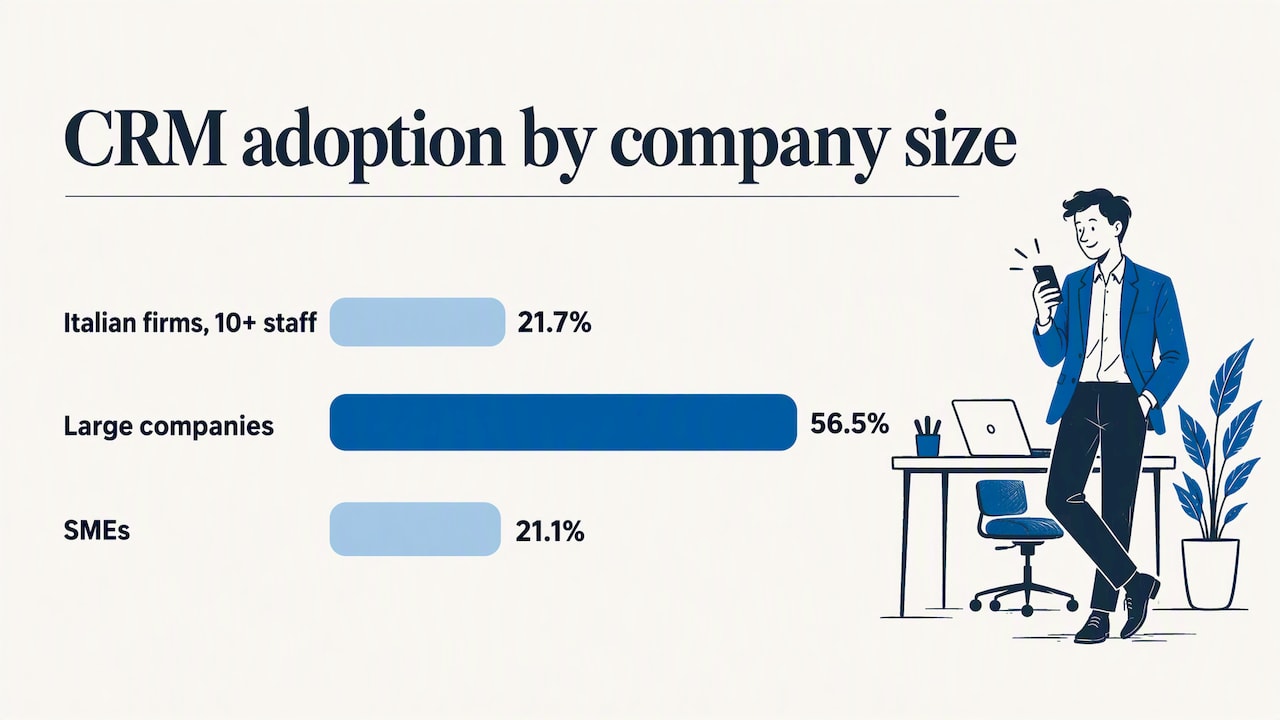
Adoption of CRM in Italy is far from universal. According to Istat’s 2025 report on enterprise ICT use, 21.7% of Italian companies with at least 10 employees use CRM systems, up 2.5 percentage points from 2023. The same report shows a clear size gap: 56.5% of large companies use a CRM, against 21.1% of small and medium-sized ones.
The same Istat data show ERP is the most widespread management software among Italian businesses, at 49.5%. For many SMEs this means the foundation already exists: customers, items, price lists and invoices live in the ERP. The sensible question is not “which CRM should we buy from scratch?” but “how do we give our agents a front end to the data we already have?”
Istat also reports that 41.9% of Italian SMEs carried out data analysis in 2025, compared with 25.7% in 2023. Good analysis needs good inputs, and the inputs come from the field.
Features that matter in the field
Long feature lists are a poor guide. These are the capabilities that change an agent’s day.
Client record and history
One screen with contacts, delivery addresses, order history, open quotes, outstanding invoices and notes. If the agent has to open three tools to learn that a client is 60 days overdue, they will skip the check and the company pays for it later.
Visit planning and fast logging
A calendar of visits and calls, with the ability to log an outcome in a few taps. Voice notes or short templates help. A visit report that takes five minutes will be written in the evening, from memory, or not at all.
Quotes and orders from the phone
The agent should be able to build a quote or enter an order with the client’s real price list, discounts and stock availability. This is where ERP integration decides everything: without it, the agent phones the office to ask for the price.
Tasks and reminders
Follow-ups, renewals, sample deliveries, contract expiry dates. Reminders should come from the data (an order not repeated in 90 days, a contract due) rather than from manual entry.
Documents and catalogs
Catalogs, technical sheets and contracts available on the device, current and searchable. Agents should not carry outdated PDFs.
Simple pipeline view
A pipeline is useful for the agent when it shows what to chase this week. It is useful for the manager when it is accurate. Keep the stages few and matched to how your company actually sells.
Mobile access, offline use and field data capture
Field work happens in warehouses, basements, industrial areas and rural roads where the signal drops. Three points decide whether a CRM survives this.
- A real mobile experience. A desktop screen squeezed onto a phone is not enough. Check the screens an agent uses most (client search, visit log, order entry) on the devices they actually carry. KPMG’s research on CRM adoption recommends an experience optimized for the device the sales team uses.
- Offline mode. Ask precisely what works without a connection: reading client data, logging visits, entering orders? And how conflicts are handled when two people edit the same record before syncing. Test it by switching the phone to airplane mode during the demo.
- Capture at the point of contact. Data entered during or right after the visit is more accurate than data reconstructed at night. Photos of shelves or equipment, signatures, quick notes and barcode scans reduce typing and errors.
Beware of features that sound useful but add burden. Route optimization and map-heavy modules matter for teams making dozens of door-to-door calls a day. For an agent with 15 to 30 established clients across a region, they are often unnecessary.
Connecting the CRM to ERP, accounting, production and e-commerce
A CRM that lives alone becomes a second database that drifts out of date. Integration is the single most important technical check.
What should flow between systems:
| Data | Direction | Why the agent cares |
|---|---|---|
| Customer master data | ERP to CRM, and back for new prospects | One client list, no duplicates |
| Price lists and discounts | ERP to CRM | Correct quotes on the spot |
| Stock and delivery dates | ERP to CRM | Promises the company can keep |
| Orders and quotes | CRM to ERP | No re-keying, fewer errors |
| Invoices and payment status | ERP to CRM | Know about overdue accounts before the visit |
| Web orders | E-commerce to ERP to CRM | The full purchase picture across channels |
Questions to ask any vendor, including us:
- Is the integration native, or built on a connector that someone must maintain?
- Is it real-time, scheduled or manual import?
- Which side is the source of truth for each field?
- Does it expose open APIs and allow data export in an interoperable format? AgID’s SaaS qualification requirements for public administration list application security, data portability, APIs and export in an interoperable format as ways to reduce lock-in risk. They are written for the public sector, but they are a sensible checklist for a private company too.
- What happens to the integration when the ERP or CRM is updated?
If you also sell online, the same logic extends to your shop. Our guides on integrating PrestaShop with an ERP and on Shopify and ERP integration show the points to check, and a field agent benefits from seeing the client’s web orders in the same record. For reporting on top of the integrated data, see how business intelligence and ERP work together and which sales dashboard KPIs are worth tracking.
Privacy, geolocation and agent data
This is the area where Italian companies most often get caught out. Many field CRMs offer GPS check-in, route tracking or location stamps on visits. Before enabling them, apply Italian rules as a careful professional would.
- Geolocation of staff is regulated. In a preliminary check, the Italian data protection authority held that apps geolocating employees must follow privacy by default, limiting data visibility to the areas each person is responsible for.
- Penalties can be heavy. In November 2024 the Garante fined a company 5 million euros for the unlawful processing of data of 35,000 riders, including background geolocation outside working hours. That is a platform-work case, but it shows how the authority views continuous tracking.
- Human oversight of automated decisions. In the same decision the Garante required that algorithmic decisions be checked by properly trained staff and recalled the right to human intervention and to contest decisions. If your CRM scores agents automatically, keep this in mind.
Practical consequences: collect location only when a clear business purpose exists, never outside working hours, tell agents exactly what is recorded, and limit who can see it. For employees, labor-law rules on remote monitoring also apply; for independent agents, the contract and the privacy notice must be clear on what data you process and why. Involve your data protection officer or a privacy consultant, and a labor-law adviser if employees are tracked, before go-live. Hosting location matters too: ask where data is stored and whether the service can run in Italy.
Why agents stop using the CRM, and what to do about it
The best-featured CRM fails if agents treat it as a chore. KPMG’s analysis of why sales teams do not use their CRM points to a consistent list: the tool does not mirror the real sales process, it asks for data without a visible benefit, it is seen as managerial control, users were not involved in the design, and communication, training and support were weak. The firm recommends process alignment, communication, change agents, targeted training, pilots with user involvement and ongoing support.
The Italian Osservatorio CRM describes adoption as a path from evaluation to launch, routine use and full adoption, where the CRM becomes the only tool for managing customers and the channel for all related data and information. That last stage is the goal: not “agents also use the CRM” but “the CRM is where client work happens”.
What works in practice:
- Give before you ask. Make sure the first thing agents get is useful: prices, stock, client balances on the phone. Reporting comes later.
- Remove the old channels. If orders still arrive by WhatsApp and spreadsheets, the CRM stays secondary. Set a date after which quotes and orders are valid only if they come through the system.
- Co-design with two or three agents. They know which fields are pointless and which steps cost minutes.
- Pilot first. Run one area or a small group for six to eight weeks, fix what hurts, then extend.
- Keep required fields few. Every mandatory field must have an owner who uses the answer.
- Train on real cases. Use the agent’s own clients, not demo data.
- Make the benefit visible. Faster commission statements, fewer calls to the office, clear lists of clients to revisit.
A practical overview of how to lower resistance to new tools, written for small businesses, appears in this marketing automation checklist for SMBs. Its step-by-step approach to introducing automation applies equally well to introducing a CRM.
Our perspective: start from the agent’s day, and from your ERP
After 30 years of working with Italian companies, we see the same pattern. The company buys a CRM to see what agents do, the agents experience it as supervision, and six months later the data is incomplete. The fix is not a stricter policy. It is a different starting point.
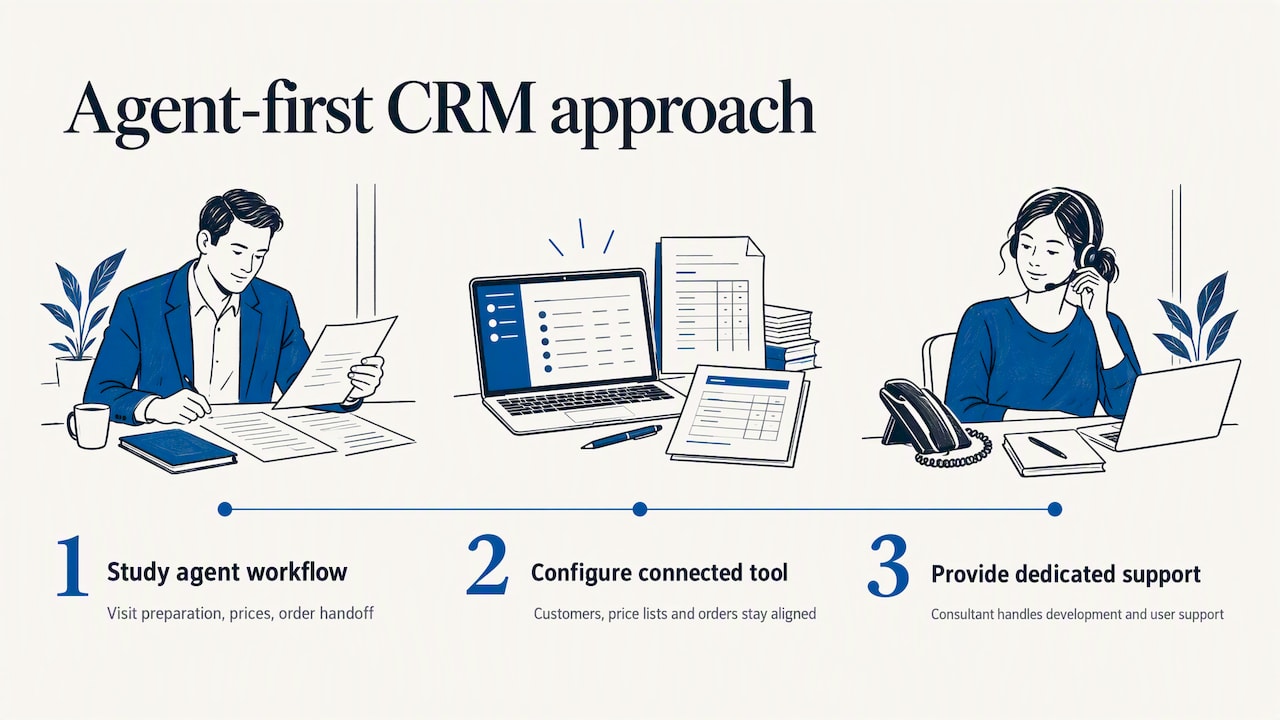
We begin by studying how your agents actually work: how they prepare a visit, where they find prices, how an order reaches the office. Then we configure the tool around that process, connected to your management system so that customers, price lists and orders are the same data everywhere. Every client has a dedicated consultant who knows the business and handles development and user support internally, without a call center in between. When an agent has a question, they talk to someone who knows their setup.
That is also why we avoid selling a generic CRM as a separate product. In many SMEs the right answer is a CRM that is part of the same ecosystem as accounting, production and sales, so that the agent sees what the office sees.
— Claudio
How to choose: a short checklist
Use these criteria when you compare options, whether you are looking at a stand-alone CRM, an ERP module or a custom configuration.
| Criterion | What to verify |
|---|---|
| Mobile | Do the core agent tasks work well on the phones or tablets your agents already have? |
| Offline | What can be read and written without signal, and how does sync resolve conflicts? |
| ERP link | Which data is synchronized, how often and in which direction? |
| Process fit | Can stages, fields and documents match how you really sell? |
| Privacy | Where is data hosted, who sees location data, and is there a documented purpose? |
| Openness | Are there APIs and a clean export, so you are not locked in? |
| Support | Who answers when something breaks, and do they know your configuration? |
| Cost over time | Licenses, configuration, training, maintenance and integration upkeep, not only the first year |
When you put a vendor through this table, ask for a demo built on your own data. A polished generic demo says little about how the tool handles your price lists and your agents’ real routes.
Our offer for companies with agents in the field
If you already run, or plan to run, a management system with Passepartout, we can show you how customers, sales and contracts are handled in a CRM integrated with the ERP. We configure the solution around your processes, train your team, and support it after launch, with a single contact who knows your company. For e-commerce operators we also connect the shop to the management system, so web and field sales share one customer record.
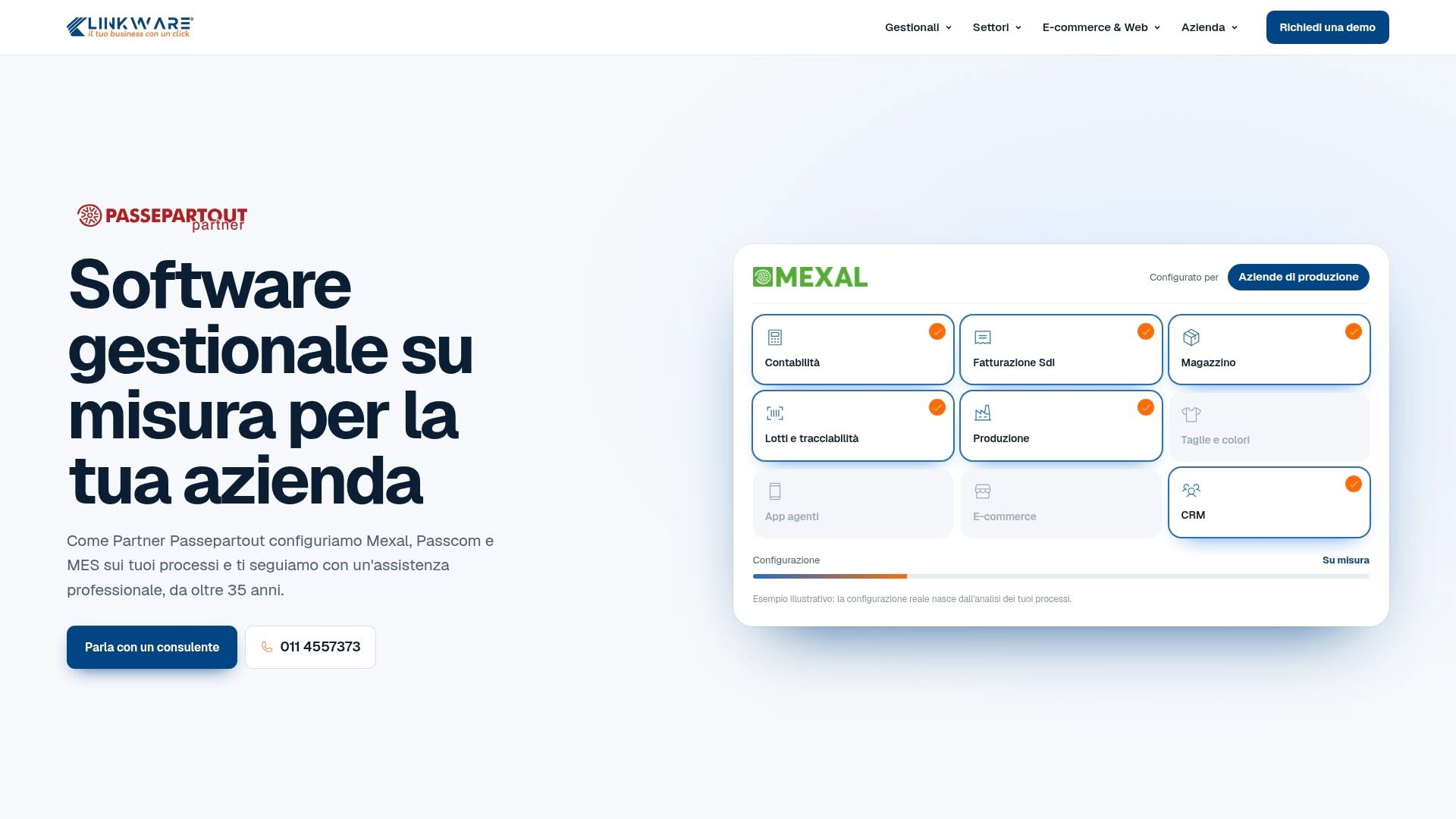
Want to see it on your own data? Request a demo from Linkware and we will walk through your agents’ workflow with you.
FAQ
What is the difference between a sales CRM and a CRM for sales agents?
A generic sales CRM is often organized around pipeline reports and forecasts for managers. A CRM for agents is organized around the visit: client history, prices, orders, tasks and quick logging on a phone. Management reports still exist, but they are built from data that agents record because it helps them sell.
Does a field CRM need to work offline?
If your agents visit places with weak coverage, yes. At minimum they should be able to read client records and log visits offline and have the data sync later. Test this during the demo with airplane mode, and ask how the system handles two edits to the same record.
Can I track my agents’ position with the CRM?
Only with great care. Italian data protection authority decisions require privacy by default and limit what can be collected and who can see it, and fines have been large in cases of continuous tracking. Define a business purpose, avoid tracking outside working hours, inform agents in writing and consult a privacy and labor-law professional first.
Should the CRM be connected to the ERP?
In most SMEs, yes. Prices, stock, orders, invoices and payment status already live in the ERP. Connecting the CRM prevents double entry and lets agents quote and promise delivery with current data.
How do I get agents to use it consistently?
Start with what helps them, involve a few agents in the design, pilot with a small group and retire the old channels for orders and quotes. Keep mandatory fields to a minimum and train on real clients. Frame the tool as support for their work, not as supervision.
Recommended
Vuoi digitalizzare la tua azienda?
Un consulente LINKWARE ti propone la soluzione su misura, senza impegno.
Richiedi una demo gratuita