
Blog · Gestionale
Ecommerce Accounting Automation: A Guide for Italian Businesses
Ecommerce accounting automation means that every online sale is recorded in your books without anyone retyping it: order, fees, refunds, payout, bank deposit and fiscal document are linked in one flow. It is not the same as copying store totals into accounting software. In Italy the flow must also respect VAT rules, electronic invoicing and record-keeping, so the first job is to map your sales before choosing any tool.
This guide explains what can be automated, how a store connects to an ERP, what to check before you start, and where a custom setup beats a simple connector.
TL;DR
- Automation means reconstructing each sale from order to bank deposit, not just syncing a daily total from the store.
- A payout is not revenue: it mixes sales, discounts, refunds and fees, so recording only the net bank amount hides gross revenue and costs.
- Before automating, map channels, customer types, destination countries, payment flows and returns, then confirm the VAT treatment with your accountant.
- An ERP connected to the store (for example l'integrazione con WooCommerce or PrestaShop) keeps orders, stock, invoices and accounts in one system.
- Start with one channel and a short test period, then extend to marketplaces and other countries.
Table of Contents
- What ecommerce accounting automation actually means
- What you can automate
- How a store connects to an ERP or accounting system
- Reconciliation: the control that makes automation reliable
- What to assess before you automate in Italy
- VAT, OSS and electronic invoicing: what the process must handle
- A step-by-step path to automation
- Signs that you have outgrown a basic connector
- Our perspective
- How we can help
- FAQ
What ecommerce accounting automation actually means
Most shops begin with a manual routine. Someone exports orders every week, downloads the payment report, checks the bank statement and types the totals into the accounting system. It works at ten orders a day. At two hundred it produces errors, late closings and numbers nobody trusts.
There are two levels of automation, and the difference matters:
- Syncing. The store sends sales totals to the accounting software on a schedule. You save typing, but the data arrives as summaries.
- Automation of the whole flow. Each order is followed through payment, fiscal document, return and collection, and the accounting entry is generated from that chain, with exceptions flagged for a person to review.
The second level is what Stripe describes in its guide to ecommerce accounting in Italy, published in May 2026: accounting has to reconstruct every sale across order, payment, fiscal document, returns and final collection, rather than treat the storefront as an isolated source of data.
The practical consequence: a tool that only posts daily totals is a sync. A process that explains every euro that reaches your bank account is automation.
What you can automate
Not every task has the same payoff. The following table separates what is usually automated from what still needs a person.
| Task | Can be automated | What a person still checks |
|---|---|---|
| Posting sales entries | Yes, from each order or from grouped orders | Unusual orders, manual price changes |
| Payment fees and commissions | Yes, if the payment report is imported | Fee changes, disputed charges |
| Refunds and returns | Yes, if the return is tied to the original order | Partial refunds, credit notes |
| Payout reconciliation | Yes, matching payout to orders and bank line | Unmatched lines, timing differences |
| Sales tax calculation | Partly, with rules configured per country and product | Exceptions, new markets |
| Fiscal documents | Yes, generated from the order data | Customers who request an invoice later |
| Expenses outside the platform | Limited | Advertising, shipping, software, supplier invoices |
Stripe’s guide notes that an integrated accounting system can create bookkeeping entries automatically, reduce manual input and improve reconciliation between orders and receipts. Shopify’s Italian guide on ecommerce accounting adds that expenses the platform does not capture, such as advertising or supplier costs, must still be tracked separately. Automation covers the sales side well. The cost side needs its own process.
Why the payout is the hard part
The bank credit you receive from a payment provider or marketplace is not your revenue. One payout can include several sales, discounts, refunds, fees and adjustments. An overview of automating ecommerce bookkeeping makes the same point: recording only the net amount hides gross revenue and costs, so a complete flow rebuilds the chain from order to fees, taxes and refunds, to payout, to bank deposit, to the accounting entry.
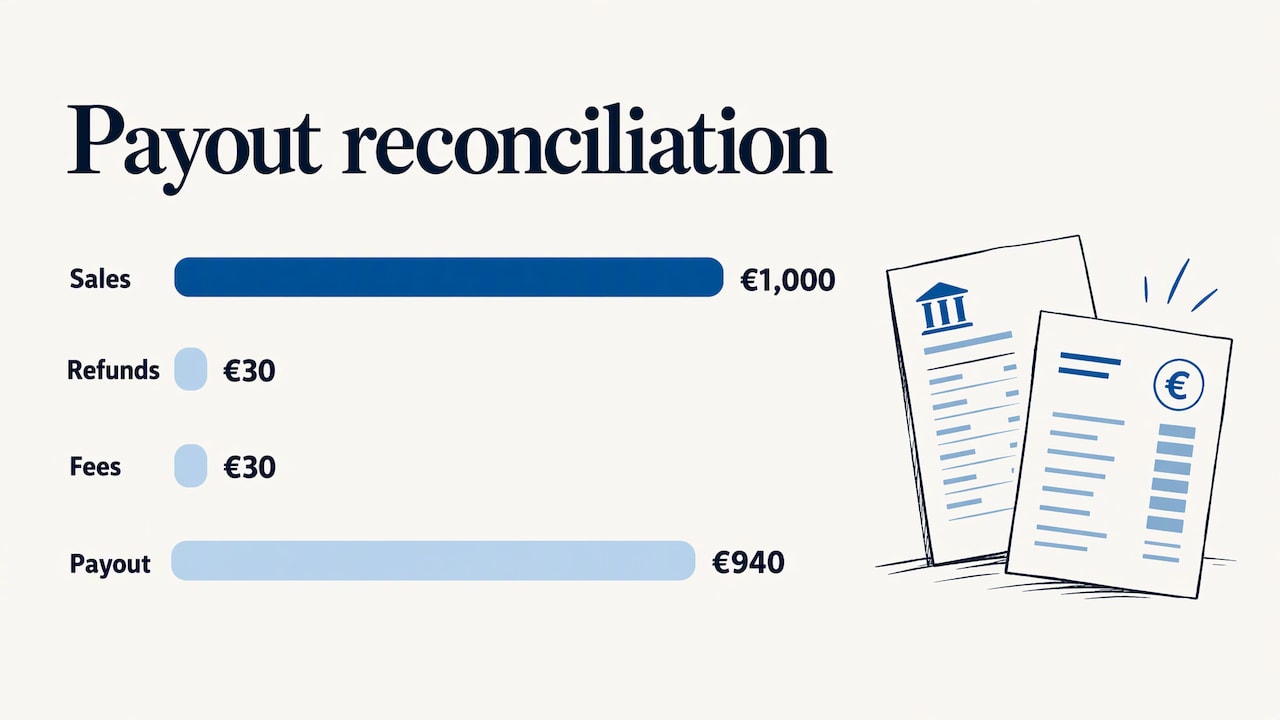
A simple example with invented numbers. A payout of 940 euros arrives. Behind it are 1,000 euros of sales, 30 euros of refunds and 30 euros of fees. If you book 940 euros as revenue, you understate sales by 60 euros and lose sight of both the refund rate and the cost of payments. With the chain rebuilt, revenue shows 1,000, refunds 30, fees 30, and the bank line matches to the cent.
How a store connects to an ERP or accounting system
The connection usually has four parts.
- Order capture. Orders from the website and from marketplaces arrive in the ERP with customer data, items, taxes and shipping.
- Payment data. Payment methods, fees and payout reports are imported and linked to the orders they cover.
- Documents. The ERP generates the fiscal document and sends it through the channels Italian rules require.
- Accounting entries. Sales, receivables, fees and refunds are posted to the right accounts, and bank movements are matched against them.
In a well-built setup the ERP is the single place where stock, orders, invoices and accounts meet. If you sell on WooCommerce, our practical guide to WooCommerce and ERP integration shows how the data moves between the two systems. Order handling is covered in how to manage ecommerce orders in the ERP without errors, and inventory in our note on WooCommerce stock sync. Accounting depends on both: if stock and orders disagree, the books will too.
Returns deserve their own attention, because a refund touches the original sale, the payment, the stock and often a credit note. See how to handle ecommerce returns for the operational side.
Reconciliation: the control that makes automation reliable
Reconciliation checks that your accounting entries match bank statement movements and supporting documents. PrestaShop’s blog on automating ecommerce accounting presents it as a reliability control rather than a technical detail: it exposes errors, bank charges and payments that were not matched correctly to invoices.
Good automated reconciliation does three things:
- It matches most lines on its own, using order numbers and payout references.
- It shows the exceptions in a short list, with the reason for each.
- It leaves a trail you can show your accountant: which order, which payout, which bank line.
When the exception list is short and understandable, month-end closing stops being a project.
What to assess before you automate in Italy
Automating a wrong process only produces wrong entries faster. Before configuring anything, write down how each sale actually works. A professional guide from commercialista.it on pre-sale tax controls suggests identifying the seller, the customer type, the destination country, the dispatch location, the payment flow, the available documents and the treatment of returns.
A useful worksheet, one row per sales channel:
- Channel: own website, marketplace, B2B portal, agents.
- Customer: consumer, company, VAT-registered business.
- Destination: Italy, other EU countries, non-EU.
- Logistics: who ships, from where, with which tracking.
- Payments: methods, commissions, chargebacks, payout timing.
- Documents: invoice on request, receipt, credit note.
- Evidence: orders, payment proof, tracking, platform reports and customer messages.
That last item matters. Another commercialista.it article on reconciling ecommerce collections advises keeping orders, payment evidence, tracking, platform reports and customer communications, because they support the reconstruction of each sale if the tax treatment is questioned. An automated system should store or link these documents, not just the numbers.
VAT, OSS and electronic invoicing: what the process must handle
The rules below change over time and depend on your situation, so treat them as a checklist for the conversation with your accountant, not as tax advice.
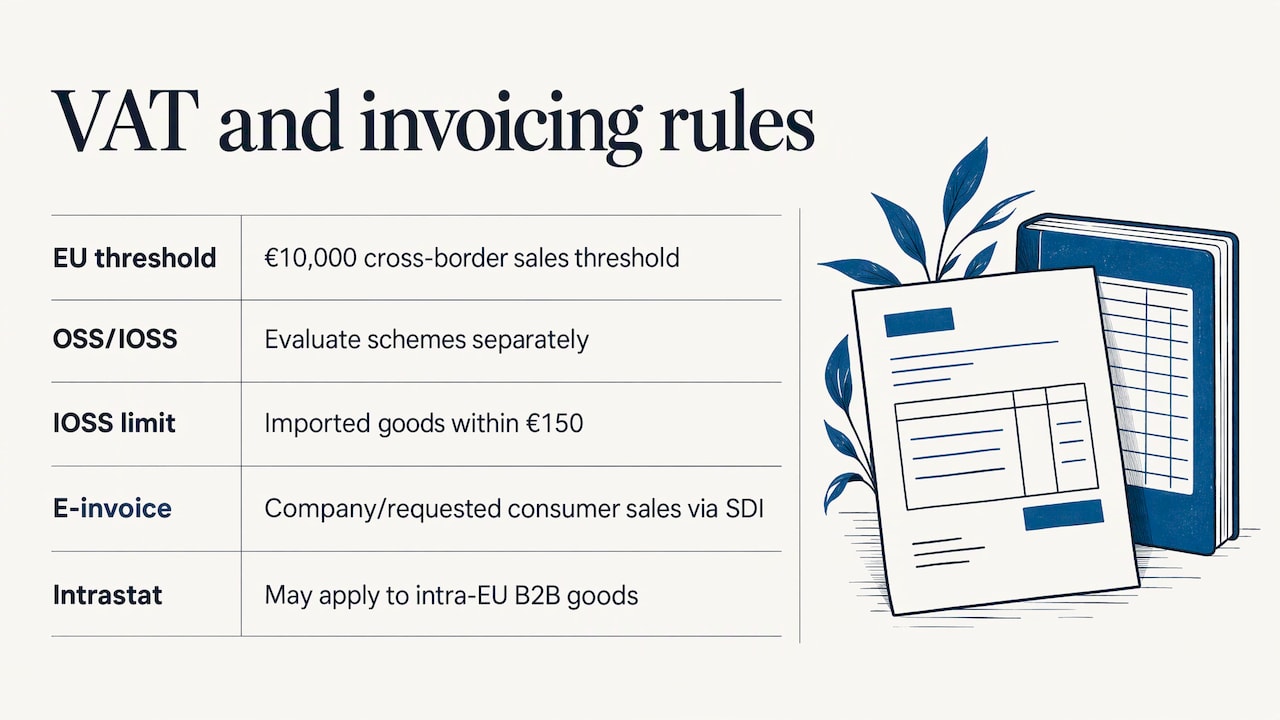
Sales to consumers in other EU countries. According to the same commercialista.it guide, cross-border EU sales are assessed against the 10,000 euro threshold, and the OSS and IOSS schemes must be evaluated separately. IOSS applies only to imported goods within the 150 euro perimeter described there. If you ship to consumers in several countries, your system needs to tag each order with its destination and VAT treatment so the data for OSS returns can be extracted without rework.
Invoices and receipts. Orders from companies, and from consumers who ask for an invoice, call for an electronic invoice through the Italian exchange system (SDI) with the customer’s identification data. Other consumer sales follow different recording rules. Which applies to each order is a decision to configure once, with your accountant, and then let the ERP apply.
Intra-EU business sales. If you sell goods to businesses in other EU countries, you may also have Intrastat obligations. Our guide to Intrastat in an ERP explains what the system should produce.
Regulatory updates. Rules and thresholds are revised from time to time. Keep an eye on regulatory updates for ERP systems so your configuration stays current, and consult your commercialista before changing the treatment of a channel.
A step-by-step path to automation
- Map the flow. Use the worksheet above for each channel. Decide who owns each step, shop or finance.
- Clean the master data. Product codes, VAT rates, customer tax IDs and payment methods must be consistent in store and ERP.
- Define the accounting rules. Which account receives sales, shipping, fees, refunds and discounts. Agree them with your accountant.
- Connect store and ERP. Start with orders and customers, then payments and documents.
- Run in parallel for a month. Compare the automated entries with your manual routine and fix the differences in the rules, not in the data.
- Review exceptions weekly. Unmatched payouts, missing documents and unusual refunds are signals that the rules need adjusting.
- Extend. Add marketplaces, other countries or B2B sales once the first channel closes cleanly.
If you also sell to businesses, turning a WooCommerce store into a wholesale channel changes the document and payment flow, so include it in the mapping from the start. Before launching a new sales channel, it can also help to look at B2B order management software to see how orders are collected and organized before they reach the books.
Signs that you have outgrown a basic connector
A simple connector can be enough for a small shop with one store, one payment provider and domestic sales. These signals suggest you need an integrated ERP instead:
- You sell through several channels with different payout schedules.
- Stock, orders and invoices live in different systems and disagree.
- You ship abroad and need VAT treatment by destination.
- You manufacture or assemble what you sell, and costs must follow production.
- Your accountant spends hours each month asking for missing documents.
In these cases the issue is not the sync but the lack of one system that holds the whole business.
Our perspective
We have worked with Italian companies for 30 years, and the most common problem we see in ecommerce is not the shop. It is the gap between the shop and the books. Orders are in one place, invoices in another, and the accountant receives a spreadsheet at the end of the month.
Our view is that accounting automation should start from the ERP, not from the connector. When sales, purchases, production and accounting live in one ecosystem, an online order is simply another transaction, handled by the same rules as any other. We integrate ERP with WooCommerce and PrestaShop, and we configure the flow around how your company really works: your channels, your payment methods, your document rules.
That is why each client has one dedicated consultant who knows the business, instead of a call center that sees a ticket. The consultant studies your processes, agrees the accounting rules with you and your accountant, and stays available after launch. Our team handles development and user assistance internally, so the people who configure the integration are the people you call.
The result we design for is simple: a clear view of sales, costs and margins, in real time, with documents and records that support compliance.
Claudio
How we can help
Linkware offers custom-configured management software, including Passepartout solutions, with integration to WooCommerce and PrestaShop, plus training, launch and professional support. We start from your processes, map your channels and configure the accounting flow with you and your accountant. You can see our solutions on the Linkware site, or explore our e-commerce and web services if you also need the store itself, hosting or privacy compliance.
Request a demo and tell us how your orders reach your books today. We will show you how the same flow can run inside one system.
FAQ
Is ecommerce accounting automation the same as connecting my store to accounting software?
Not exactly. A connection usually sends sales totals on a schedule. Automation follows each sale through payment, fees, refunds, document and bank deposit, and generates the entries from that chain. The second gives you reconciled numbers instead of summaries.
Can I automate refunds and payment fees?
Yes, as long as refunds are linked to the original order and the payment provider’s reports are imported. The system can then post the refund, the fee and the net payout separately. Partial refunds and credit notes should be reviewed by a person at first, until the rules are proven on your data.
What should I prepare before starting?
Map each channel, customer type, destination country, payment flow and return process, and keep the supporting documents: orders, payment proof, tracking and platform reports. Then agree the VAT and document treatment with your commercialista. The configuration follows from these decisions.
Do I need an ERP, or is a connector enough?
A connector can serve a small shop with one channel and domestic sales. When you add marketplaces, foreign customers, B2B sales or your own production, an ERP that holds stock, orders, invoices and accounts together reduces rework and mismatches.
Who should set the accounting rules?
You and your accountant decide the treatment, and your ERP consultant configures it. Keeping the accountant involved from the start avoids corrections later, especially for OSS, invoices and returns.
Recommended
Vuoi digitalizzare la tua azienda?
Un consulente LINKWARE ti propone la soluzione su misura, senza impegno.
Richiedi una demo gratuita