
Blog · Gestionale
Ecommerce Hosting Security: What to Check and Why It Matters
Ecommerce hosting security is the set of protections that sit under your store: the server, the network, the encryption, the backups, the firewall and the people who respond when something goes wrong. A good plugin or a strong admin password cannot make up for a weak hosting environment. In Italy, you also have legal duties: card data must be protected, personal data breaches must be handled within strict deadlines, and online payments must follow strong customer authentication rules. This guide explains what to look for in a hosting setup, how it relates to PCI DSS, and what to do if the worst happens.
TL;DR
- Hosting is the base layer of store security: HTTPS, a web application firewall (WAF), anti-virus, remote backups and incident support should all be part of the setup.
- Shared hosting carries a specific risk: a weakness on another site in the same environment can expose yours.
- Outsourcing hosting or payments never removes your PCI DSS responsibility as a merchant. It only changes which parts you manage.
- Under GDPR, a personal data breach generally has to be reported to the Garante within 72 hours of becoming aware of it, unless it is unlikely to put people at risk.
- Write down your breach response plan before you need it, including who restores backups and who talks to customers.
Table of Contents
- How hosting affects the security of an online store
- The hosting security checklist
- Shared, VPS, dedicated or managed: what changes for security
- PCI DSS: what hosting does and does not solve
- Strong customer authentication and payments
- GDPR: security duties and breach reporting
- What to do if your store is hacked
- Security, speed and visibility are connected
- Our perspective
- How Linkware can help
- FAQ
How hosting affects the security of an online store
Ecommerce security covers everything that protects a store and its customers from fraud, data theft and unauthorized access: payment processing, account authentication, customer data storage and the technology layer the store runs on. Hosting is that last layer. It decides who can reach your server, how traffic is filtered, where your data lives and how quickly you can recover.
The threats are well known. They include card-not-present payment fraud, phishing, account takeover through stolen credentials, bot attacks and DDoS attacks, as Shopify’s overview of ecommerce threats lists them. Some of these attack your application (a vulnerable plugin, a weak admin login). Others hit the infrastructure (traffic floods, an unpatched server). Hosting is your main defense against the second group, and it also limits the damage from the first.
For a small or medium business, this has a practical consequence. You rarely have an in-house security team, so the hosting provider’s setup and support effectively become part of your security team. Choosing it deserves the same attention as choosing the platform itself. If you run WooCommerce collegato al gestionale, our guide to WooCommerce security checks covers the application side in detail.
The hosting security checklist
Visa’s guidance for ecommerce merchants on website security is a useful reference point. It says to choose a secure, PCI-compliant hosting provider that runs backups to a remote server with restore capability, provides a WAF and anti-virus, and offers ongoing technical support including incident response. It adds that in shared systems the provider needs extra safeguards to protect each customer’s environment, and that the contract should state the provider’s responsibilities for cardholder data security.
Turning that into a working checklist:
| Area | What to have in place | Why it matters |
|---|---|---|
| Encryption | HTTPS on the whole store, valid certificate, automatic renewal | Protects logins, carts and checkout data in transit |
| Firewall | A WAF in front of the application | Blocks common attacks such as injection attempts and malicious bots |
| Malware protection | Anti-virus and file monitoring on the server | Catches infected files before customers do |
| Backups | Automatic, stored on a separate remote server, with tested restore | Lets you recover after an attack or a failed update |
| Isolation | Your site separated from other customers’ sites | Limits the spread of a compromise |
| Updates | Operating system, PHP, database and CMS patched on a schedule | Closes known vulnerabilities |
| Access control | Multi-factor authentication, limited admin accounts, login attempt limits | Reduces account takeover |
| Support | Technical staff who can act during an incident | Shortens downtime and data exposure |
| Contract | Written security responsibilities of the provider | Makes it clear who handles what |
Let’s look at the items that cause the most confusion.
HTTPS everywhere
The Italian Agency for Digital Italy (AGID) states in its guidelines on threat modeling that HTTPS should preferably cover all access points of a web application. Where it must be limited, it should at least cover authentication pages and every page after login. For a store, the simplest rule is the safest: serve every page over HTTPS, and make sure the certificate renews automatically so it never expires on a weekend sale.
Backups that you can actually restore
A backup stored on the same server as the store disappears with the store. Keep copies on a separate system, and know how long a restore takes. A backup you have never restored is an assumption, not a plan. Decide in advance how much data you can afford to lose: for a store taking orders all day, a nightly backup means up to a day of orders to reconstruct.
A WAF and anti-virus
A web application firewall filters requests before they reach your store. It does not replace updates, but it gives you time between the publication of a vulnerability and the moment you patch it. Anti-virus and file integrity monitoring complete the picture by flagging files that should not be there.
Updates and access
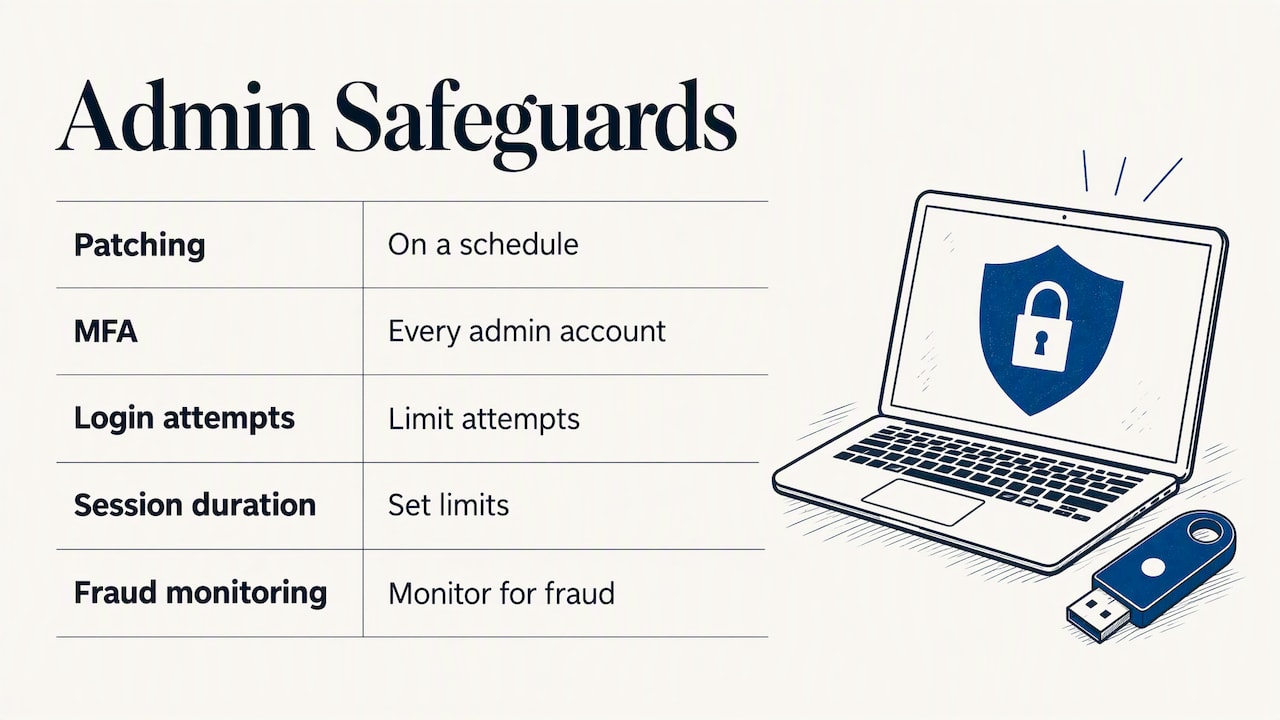
Most successful attacks on small stores use known vulnerabilities in outdated components or stolen passwords. Patching on a schedule and enforcing multi-factor authentication on every admin account address both. Limiting login attempts and session length is also a standard control in banking security rules: the Bank of Italy’s Circular 285 lists strong authentication, limits on log-in attempts and session duration, and fraud monitoring among the safeguards banks must apply to internet payment services. The same logic works well for your own admin area.
Shared, VPS, dedicated or managed: what changes for security
The type of hosting changes your risk profile more than most store owners expect.
- Shared hosting: many sites on one server. It is the cheapest option, but the isolation between accounts depends entirely on how the provider configures it.
- VPS or cloud server: a virtual machine with its own resources. Isolation is stronger, but you or someone on your behalf must manage updates, firewall rules and monitoring.
- Dedicated server: hardware used by one customer. It gives full isolation and full responsibility.
- Managed hosting: the provider handles the server layer (updates, monitoring, backups, technical maintenance) and you focus on the store.
The PCI Security Standards Council’s e-commerce guidelines point to the specific problem with shared environments: a merchant’s site can be compromised through weaknesses of other sites on the same server, so you need to understand whether your site is hosted in a shared environment. That is why a store that takes payments or stores customer accounts usually belongs on an isolated environment with active management, not on the cheapest shared plan.
For Italian businesses there is another point: where the data sits. Our hosting services run in the cloud or on dedicated servers in Italy, which keeps customer data under a clear jurisdiction and simplifies the GDPR documentation you have to maintain. You can read more about our managed hosting for websites and ecommerce, or, if your ERP runs in the same environment, about managed ERP hosting.
PCI DSS: what hosting does and does not solve
PCI compliance is one of the most searched topics around ecommerce hosting, and also one of the most misunderstood. PCI DSS is the security standard of the card networks. It applies to anyone who stores, processes or transmits card data, or who can affect the security of that data.
The key point comes straight from the PCI SSC guidelines: no option eliminates the merchant’s PCI DSS responsibilities entirely. Even when you outsource, you remain responsible for making sure card data is protected, and you must monitor the connections and redirections between your site and third parties to preserve integrity.
In practice, your setup determines how much of the standard lands on your shoulders:
- Card data never touches your server. Customers enter card details on a page or form hosted by the payment provider. Your scope is smaller, but your store still has to make sure the redirection or embedded form has not been tampered with.
- Card data passes through your server. Your hosting environment is then fully in scope, with all the requirements on network security, access control, logging and testing that follow.
- Card data is stored. This is the heaviest case, and for most small and medium stores it is neither necessary nor advisable.
For most Italian stores, the first option is the sensible one: use a payment gateway so card details stay with the payment provider. Italian payment providers also publish checklists for ecommerce partners. One of them lists protection of the server against unauthorized access, card data transferred over a secure encrypted link of at least 128-bit SSL, and transactions processed under standards such as Visa Secure and Mastercard Identity Check. The same checklist states that card data is not forwarded to third parties and must be protected under PCI DSS.
A hosting provider that is described as “PCI compliant” helps with the infrastructure part. It does not make your store compliant on its own: the way your store handles payments, the plugins you install and the access you grant remain yours to manage. Put the split of responsibilities in writing in your hosting contract.
Strong customer authentication and payments
Hosting is not the only thing standing between a customer and a fraudulent payment. In Italy, online payments are subject to strong customer authentication (SCA). The Bank of Italy explains that SCA is based on two or more elements from at least two categories: knowledge, possession and inherence, and that the elements must be independent of each other. The authorization code must also be single-use and bound to the amount and the payee, so it cannot be reused for another payment.
What this means for a merchant: choose a payment gateway that supports SCA and the 3-D Secure flows correctly, and make sure your checkout does not interfere with the redirection or the authentication step. Banks and payment providers also tell customers to use strong passwords that are not reused across services, as the Nexi guide to payment security explains. It is worth passing the same advice on to your own customers who have accounts in your store.
GDPR: security duties and breach reporting
An online store holds names, addresses, order histories and often account credentials. That makes GDPR a security topic, not just a paperwork topic.
The Italian data protection authority (Garante) says there are no generalized “minimum” measures after 25 May 2018: the list in Article 32 GDPR is open and non-exhaustive, and the assessment is made case by case, in proportion to the risks. Its page on security measures mentions, among others, pseudonymization and encryption, measures for confidentiality, integrity, availability and resilience of systems, the ability to restore data promptly and regular testing of the measures’ effectiveness. Notice how closely this matches the hosting checklist above: encryption, backups, restore procedures and regular checks.
If a breach happens, the timeline is short. The Garante reminds data controllers that they must notify a personal data breach without undue delay and, where feasible, within 72 hours of becoming aware of it, unless the breach is unlikely to result in a risk to people’s rights and freedoms. The European Data Protection Board gives small businesses three working rules: document breaches, notify the authority within 72 hours unless a risk is unlikely, and inform the people affected without undue delay when the risk is high.
Two practical consequences follow:
- You need logs and monitoring good enough to say what happened and when. Without them, you cannot assess the risk or write the notification.
- Your hosting provider must tell you quickly if they detect an incident on their side. Agree on this in advance. If you want a structured review of your store’s privacy setup, we offer GDPR and privacy consulting for websites, and our article on GDPR compliance for ERP systems covers the back-office side.
What to do if your store is hacked
Having a written plan matters more than any single tool. The sequence below follows common incident response practice and the 72-hour GDPR clock.
- Contain. Put the store in maintenance mode if needed, and contact your hosting provider immediately so they can isolate the environment.
- Secure access. Review all admin accounts, remove those you do not recognize, enable multi-factor authentication and reset every credential: admin users, database, FTP or SSH, API keys and payment gateway keys.
- Preserve evidence. Keep the server and application logs before anything is overwritten. You will need them to understand the entry point and to document the breach.
- Establish the scope. Determine which data was reachable: customer records, orders, and whether any payment data was exposed. If card data may be involved, tell your payment provider.
- Clean and restore. Depending on the case, this means restoring a clean backup or rebuilding on a fresh instance, then updating every component before going live again.
- Notify. Record the breach in your internal register. If it is likely to put people at risk, notify the Garante within 72 hours and inform affected customers when the risk is high.
- Monitor. Watch the site closely for weeks after the incident: new admin accounts, modified files, unusual traffic.
The quality of steps 1 and 5 depends almost entirely on your hosting: whether support is reachable, whether the backup is clean and recent, and whether the provider can rebuild an environment quickly. That is the strongest argument for treating hosting as a security decision and not only a cost line.
Security, speed and visibility are connected
A secure setup also supports other goals. A site flagged for malware or showing certificate warnings loses customers and search visibility. A well-configured server with caching and current software is also faster, which affects conversion; see our WooCommerce speed optimization guide. And compromised stores often get injected with spam pages that damage rankings, which is one more reason to read our practical guide to ecommerce SEO. For a broader overview of the business case, the article on why cybersecurity matters for ecommerce success summarizes the main risks and safeguards.
Our perspective
In our work with small and medium businesses, we see the same pattern: the store is built with care, and the hosting is chosen last, mostly on price. Then the store grows, orders start to flow into the ERP, customer data accumulates, and the infrastructure that was an afterthought becomes the most critical piece.
That is why we do not treat hosting as a separate product. We handle server management, technical maintenance, updates and hosting in the cloud or on dedicated servers in Italy together with the store and its integration with the management system. Every client has a dedicated consultant who knows how the business works, so when something unusual happens, you talk to a person who already knows your processes and not to a call center.
Our advice is simple: decide who is responsible for each layer (server, application, payments, data), write it down, and make sure someone is watching it every day. A store that is integrated with its ERP, hosted in a managed environment and supported by the same team that built it is easier to protect, easier to restore and easier to explain to an auditor or to the Garante.
Claudio
How Linkware can help
If you run a WooCommerce or PrestaShop store, or you are planning to launch one, we can configure the store, the hosting and the connection with your ERP as one coherent system, with a single contact person who follows it over time. Our managed hosting service covers server management and technical maintenance, and our web services page presents ecommerce creation, GDPR and privacy support and white label solutions.
Tell us how your store is hosted today and we will walk you through a tailored setup for your company. You can reach us from the Linkware website.
FAQ
Is shared hosting safe enough for an ecommerce store?
It depends on how the provider isolates accounts and manages the server. The PCI Security Standards Council warns that a site in a shared environment can be compromised through weaknesses of other sites on the same server. For a store that handles customer accounts or payments, an isolated, actively managed environment is the more prudent choice.
Does a PCI-compliant host make my store PCI compliant?
No. A compliant host covers the infrastructure it manages, but PCI SSC guidance states that no option removes the merchant’s own responsibilities. You still have to protect card data in your own flows and monitor the connections to third parties. Using a payment gateway that keeps card data off your server reduces how much of the standard applies to you.
How fast do I have to report a data breach in Italy?
Under GDPR, the data controller must notify the Garante without undue delay and, where possible, within 72 hours of becoming aware of the breach. The exception is when the breach is unlikely to put people’s rights and freedoms at risk. If the risk is high, the people affected must also be informed without undue delay.
What is the minimum hosting security I should expect for an online shop?
HTTPS on every page, a web application firewall, anti-virus, regular updates, multi-factor authentication for admins and remote backups with a tested restore. You should also have technical support that can act during an incident and a contract that states who is responsible for what.
Where should I host an Italian store’s customer data?
GDPR does not require one specific location in every case, but hosting in Italy keeps your data under a clear jurisdiction and makes your documentation simpler. Our services run in the cloud or on dedicated servers in Italy, and we can help you decide what fits your store and your ERP.
Recommended
Vuoi digitalizzare la tua azienda?
Un consulente LINKWARE ti propone la soluzione su misura, senza impegno.
Richiedi una demo gratuita