
Blog · Gestionale
Production Scheduling in ERP: How It Works and What to Set Up
Production scheduling in an ERP decides which production order runs on which resource, in what sequence and at what time. It starts from the orders and the plan the system has already produced. Production planning sits one level above: it works out how much to make and which materials are needed. Purchase planning follows from the plan and turns material needs into purchase orders. A manufacturer gets reliable dates only when the three share the same data: bills of materials, routings, stock, supplier lead times and machine capacity.
This guide explains how each step works, what data feeds it, where the usual problems appear and when a basic ERP needs finite capacity scheduling or shop floor data on top.
TL;DR
- Planning answers “how much, and what do we need to buy or make”. Scheduling answers “which job, on which machine, starting when”.
- Purchase planning is a result of the production plan: no reliable bill of materials and lead times, no reliable purchase proposals.
- A schedule is only as good as its inputs: routings, work center calendars, stock accuracy and supplier lead times.
- Classic MRP calculates materials without limiting capacity. Finite capacity scheduling adds the real limits of machines and people.
- Real-time shop floor feedback keeps the schedule alive when orders change.
Table of Contents
- Production planning and production scheduling: the difference
- How an ERP turns demand into a production schedule
- The data a reliable schedule needs
- Purchase planning: from production plan to purchase orders
- What disrupts a schedule, and how the ERP absorbs it
- When basic MRP is not enough
- Connecting the shop floor
- A step-by-step setup checklist
- Our perspective
- Plan your scheduling with Linkware
- FAQ
Production planning and production scheduling: the difference
The two terms are often used as synonyms, and in ERP software they are close neighbors, but they answer different questions.
| Production planning | Production scheduling | |
|---|---|---|
| Question | How much do we make, and what do we need? | Which order, on which resource, in what order and when? |
| Time horizon | Weeks to months | Days to weeks |
| Input | Sales orders, forecasts, stock, bills of materials | Production orders, routings, machine and labor calendars |
| Output | Planned production orders, material requirements, purchase proposals | Sequenced operations with start and end times per work center |
| Typical owner | Planner, purchasing, management | Production manager, shop floor supervisor |
Academic literature on production information systems draws the same line. It places the ERP at the center of supply chain management and adds complementary systems for planning and controlling production, including APS (Advanced Planning & Scheduling) systems. It also distinguishes capacity allocation modules such as CRP (advanced planning) from FCS (advanced scheduling), as described in this university chapter on information systems supporting production.
In practice: planning produces the list of production orders that should exist. Scheduling puts those orders on a calendar that the shop floor can actually follow.
How an ERP turns demand into a production schedule
The flow is the same in most manufacturing ERPs, whatever the vendor. Each step depends on the one before it.
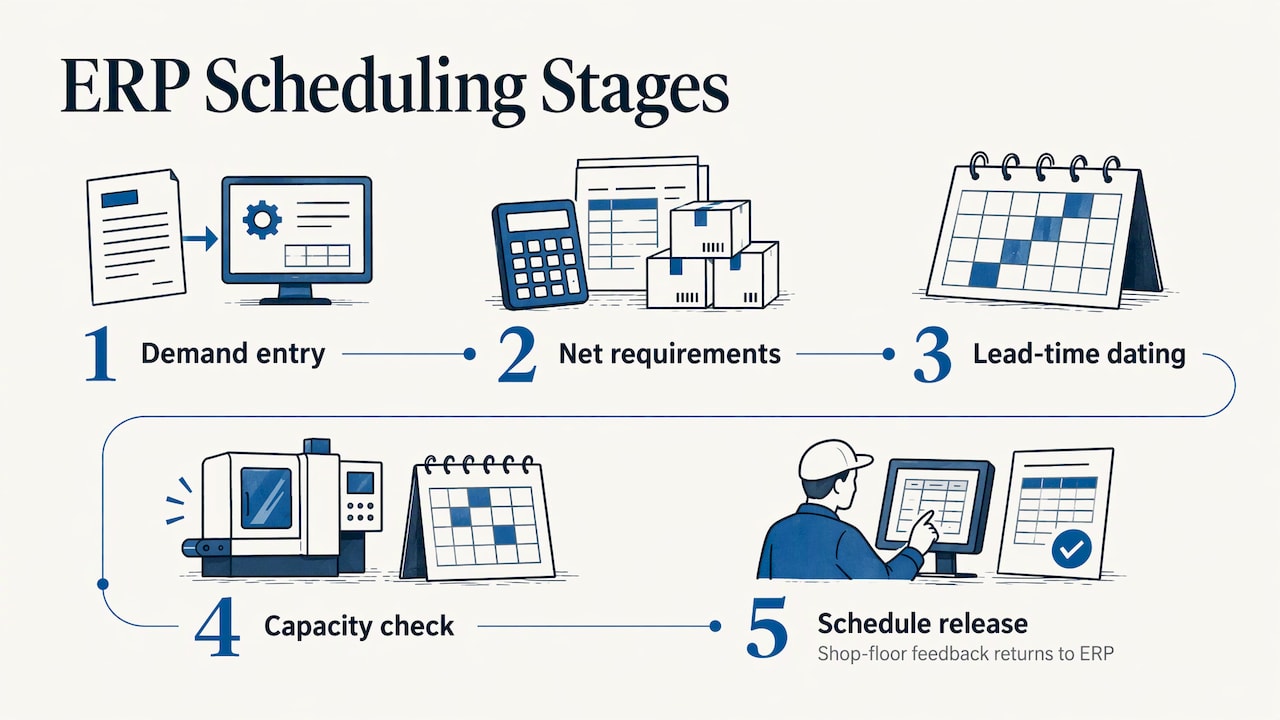
1. Demand enters the system
Demand comes from customer orders, sales forecasts, minimum stock levels or a mix of the three. Make-to-stock companies lean on forecasts and reorder levels. Make-to-order companies start from confirmed orders and promised delivery dates. Many SMEs run both on different product families, and the ERP has to handle each logic separately.
2. Net requirements are calculated
The system compares demand with available stock and open orders. What remains is the net requirement. For finished goods this becomes planned production orders. For components and raw materials it becomes planned purchase or subcontracting orders. This calculation is the MRP logic, and it depends on the bill of materials for every item. If you are choosing or reviewing this layer, our guide to MRP and ERP for manufacturing SMEs covers what to check.
3. Orders are given dates through lead times
The ERP works backward from the due date. It subtracts the lead time of each operation in the routing, then the lead time of each component. This gives start dates for production orders and order dates for purchases. Wrong lead times produce wrong dates, and no later step corrects them.
4. Capacity is checked
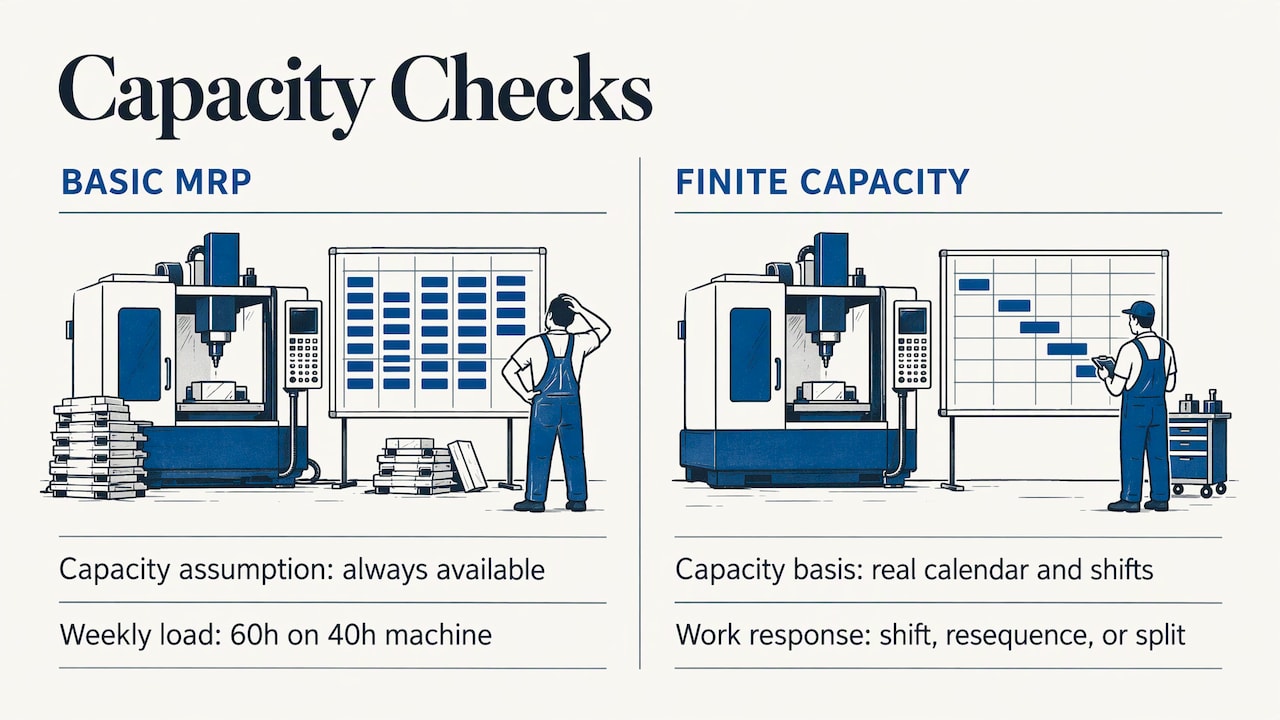
This is where simple and advanced systems diverge. A basic MRP run assumes that capacity is always available. It will schedule 60 hours of work on a machine that has 40 hours in the week. A finite capacity approach loads each work center against its real calendar and shifts, resequences or splits the work. Our practical guide to finite capacity scheduling shows how this works for manufacturing SMEs.
5. The schedule is released and tracked
Orders are released to the shop floor with a sequence, a start time and a list of materials. As operations are completed, quantities, times and scrap are fed back. The ERP updates the remaining work and the expected completion date. Without that feedback, the schedule is a plan on paper that drifts from reality within days.
The data a reliable schedule needs
Most scheduling problems are data problems. Before looking at features, check these inputs.
- Bills of materials: complete, current, with correct quantities and scrap factors. A missing component means a missing purchase proposal.
- Routings: the operations, in order, with setup time and run time per unit, and the work center for each. Time standards that nobody has verified for years make every date unreliable.
- Work centers and calendars: shifts, holidays, planned maintenance, number of machines or operators per center.
- Stock accuracy: the plan subtracts on-hand stock from requirements. If the warehouse count is wrong, the plan is wrong in the same direction.
- Supplier lead times: actual delivery times, not the ones written in the contract three years ago.
- Order status: confirmed, tentative, on hold. Mixing them inflates the plan.
- Subcontracting: external processing steps have their own lead times and transport legs. If you use external processing, see our guide to subcontracting (conto lavoro) in ERP.
Purchase planning: from production plan to purchase orders
Purchase planning is not a separate exercise. It is the part of the same calculation that deals with items you buy rather than make.
The logic runs in four moves:
- The production plan fixes the quantity and start date of each finished product and sub-assembly.
- The bill of materials explodes this into gross requirements per component.
- Available stock, open purchase orders and safety stock are subtracted.
- Supplier lead time and order policy (lot sizes, minimum order quantities, order multiples) turn the net need into a proposed purchase order with an order date.
A short worked example. Suppose a production order for 200 units starts on a Monday and each unit needs 2 meters of a profile. The gross need is 400 meters. If 150 meters are in stock and 100 are already on order, the net need is 150 meters. If the supplier delivers in 10 working days and sells in rolls of 100 meters, the system proposes 200 meters, to be ordered at least two weeks before the start date.
Three practical points follow:
- Review proposals by exception. Planners should look at late orders and shortages, not at every line.
- Keep supplier lead times and minimum quantities in the item record, so proposals respect them automatically.
- When the schedule moves, purchase proposals move with it. This only happens if both run on the same ERP data.
The same logic supports lean approaches. If your plant uses pull systems, our article on just in time with ERP, kanban and lean explains how replenishment signals fit alongside MRP.
What disrupts a schedule, and how the ERP absorbs it
No schedule survives a month untouched. What matters is how fast the system shows the consequences of a change.
Machine capacity
A breakdown or a planned maintenance stop reduces available hours. With calendar-based capacity, the stop is entered once and every affected order shows a new date. Without it, the planner recalculates by hand in a spreadsheet.
Labor availability
Skills matter as much as headcount. If only two operators can run a certain machine, the work center capacity is two operators’ hours, not the machine’s hours. Modeling this in the ERP prevents promises that nobody can keep.
Inventory changes
A late delivery, a quality rejection or an inventory count correction changes net requirements. The ERP should recalculate and flag the orders that can no longer start on time.
Changing orders
Urgent orders, quantity changes and canceled orders are normal in SME manufacturing. A good scheduling process separates a frozen window, where only the production manager can change things, from the later horizon, where the system can resequence freely. This avoids constant rescheduling of work that has already started.
When basic MRP is not enough
Signs that you need more than a standard MRP run:
- Delivery dates promised by sales are regularly missed even though materials arrived on time.
- Planners keep a separate spreadsheet to sequence jobs on the machines.
- Some work centers are permanently overloaded while others wait.
- Setup times depend on the order of jobs, for example color changes or tool changes.
- You cannot tell a customer a reliable date without walking to the shop floor.
In these cases there are two common routes. The first is finite capacity scheduling inside or tightly connected to the ERP. The second is a dedicated APS layer, which is more specialized in optimization. Companies exploring the second route also look at how AI can help optimize production scheduling in plants, for instance for sequencing and predicting disruptions. Whichever route you take, it only pays off when bills of materials, routings and stock are already reliable.
Connecting the shop floor
Scheduling needs a return channel. If operators report progress on paper at the end of the shift, the ERP learns about delays a day late.
There are two levels of connection:
- Manual reporting at terminals or tablets: operators confirm start, end, quantities and scrap per operation. It is simple and works for many SMEs.
- Automatic data collection from machines: counts, cycle times and stops arrive without typing. This is covered in our guide to shop floor data collection.
A il nostro MES per la produzione sits between the ERP and the machines and manages execution in detail. If you want to understand how the two systems exchange orders and confirmations, read how to connect the shop floor and the ERP, or see our MES software for Industry 4.0 and 5.0.
Once data flows back, you can measure whether the schedule works. Adherence to plan, on-time delivery, setup time and work center load are the indicators that matter most. Our article on production KPIs in ERP explains which to track and how to bring them into BI dashboards.
A step-by-step setup checklist
- Clean the master data. Verify bills of materials, routings and units of measure on the products that make most of your revenue first.
- Define work centers. Capacity, shifts, calendars and the number of resources for each.
- Set realistic lead times. Use actual supplier delivery history and measured operation times.
- Choose planning parameters per item. Make or buy, lot size, safety stock, order policy.
- Run MRP on a pilot family. Compare the proposals with what your planners would have decided and adjust parameters.
- Add capacity logic. Load the work centers, find the bottlenecks, decide on a frozen window.
- Close the loop. Start collecting confirmations from the shop floor.
- Review monthly. Compare planned and actual dates and correct the data behind the differences.
Our perspective
We see the same pattern in manufacturing SMEs. The software is rarely the weak point. The weak point is that planning, purchasing and the shop floor each keep their own version of the truth.
That is why we start from the processes, not from the module list. A dedicated consultant studies how your company really plans, buys and produces, then configures the ERP around it. You talk to the same person who knows your bills of materials, your bottleneck machines and your suppliers, not to a call center.
Our team handles development and user assistance internally, so a change in your scheduling rules does not pass through several companies. For companies on the Passepartout platform, Passepartout Plan covers production planning with MRP logic, and it can be extended with finite capacity scheduling, MES and BI dashboards as your needs grow.
We would rather build the schedule in steps that your planners trust than switch on every function on day one.
Claudio
Plan your scheduling with Linkware
Linkware has 30 years of experience in management software for manufacturing, commerce, logistics and professional firms, and works with Passepartout solutions, MES, il software WMS per il magazzino and business intelligence. We configure the ERP to your own production flow, train your team and stay available for support after go-live. If you want to see how planning, purchasing and scheduling could work on your data, talk to us about a tailored ERP.
If you are still comparing the degree of tailoring you need, our guides on ERP customization versus configuration and on governing ERP customization without risk will help you define the scope.
FAQ
What is the difference between ERP production planning and scheduling?
Planning decides quantities and materials: what to produce, what to buy and by when. Scheduling assigns the resulting production orders to machines and people, with a sequence and start and end times. In an ERP the first feeds the second.
How is production scheduling done in an ERP?
The ERP takes the production orders generated by planning and subtracts operation lead times from the due date to find start dates. It then loads work centers against their calendars. With finite capacity, it resequences work that exceeds available hours. Shop floor confirmations update the schedule as work progresses.
How does purchase planning use the production plan?
The production plan is exploded through the bills of materials into component requirements. The ERP subtracts stock and open orders, then applies supplier lead times and order quantities to propose purchase orders with order dates. When the production schedule changes, the proposals should change with it.
Do I need a separate APS if I already have an ERP?
Not always. Many SMEs get reliable dates from MRP combined with finite capacity scheduling and good shop floor feedback. A dedicated APS becomes relevant with complex sequencing, many constraints or strong optimization needs. The decision starts from your actual bottlenecks.
Which data should I fix first?
Start with bills of materials, routings and stock accuracy for the products that generate most of your revenue. Then check supplier lead times and work center calendars. Wrong inputs here produce wrong dates in every later step.
Recommended
Vuoi digitalizzare la tua azienda?
Un consulente LINKWARE ti propone la soluzione su misura, senza impegno.
Richiedi una demo gratuita