
Blog · Gestionale
SEO for WooCommerce: The Practical Guide for Italian Stores
WooCommerce collegato al gestionale SEO comes down to five things: a clean technical base, product and category pages that answer what shoppers search for, correct product structured data, fast pages, and regular measurement in Google Search Console. This guide walks through each one in the order we would work on a store, with attention to what changes when your customers are in Italy.
TL;DR
- Fix the technical base first: indexing, duplicate URLs, sitemaps, breadcrumbs and speed. Content work on a store Google cannot crawl well is wasted.
- Treat category pages as your main landing pages. Give each one a unique description, a clear hierarchy and internal links to its products.
- Add Product structured data that matches what the shopper sees on the page, and keep it in the initial HTML.
- If you sell in more than one language, use separate URLs and hreflang. Do not rely on a language switcher that changes content dynamically.
- Measure with Search Console: clicks, impressions, click-through rate and average position by page and country.
Table of Contents
- Start with the technical base
- Keyword research for a store, not a blog
- Optimize product pages
- Optimize category pages
- Add product schema correctly
- If you sell in more than one language
- Speed and Core Web Vitals
- Our perspective: the data behind the store
- Measure what works
- When to ask for help
- FAQ
Start with the technical base
WooCommerce runs on WordPress, so it is flexible, but it also generates a lot of URLs: filtered listings, tag pages, sorting parameters, cart and account pages. Before you write a single product description, check how Google sees the store.
Search Console gives you the tools for this. Its reports include Page indexing, Sitemaps, URL Inspection, Core Web Vitals, Rich Result Status and Links, which together cover crawlability, indexing, performance and internal links. A practical first audit looks like this:
- Submit your XML sitemap and confirm that it lists products and categories, not cart, checkout or account pages.
- Open the Page indexing report and read the reasons pages are excluded. Parameter URLs from filters and sorting are the usual cause of duplicates.
- Inspect a few representative URLs (a product, a category, the home page) with URL Inspection to see the rendered page Google sees.
- Check that the site runs on HTTPS, with one preferred version of the domain.
- Review the Links report to see which pages receive the most internal links, and whether those are the pages you want to sell from.
Hosting is part of this base. A slow or unstable server affects crawling and shoppers alike. If you want to understand what to look for in a managed environment, our guide to managed WordPress hosting for Italian SMEs covers it, and security matters just as much, which is why we wrote a checklist on WooCommerce security.
Keyword research for a store, not a blog
Store keywords split into three kinds, and each belongs on a different type of page.
| Search intent | Example | Page that should rank |
|---|---|---|
| Broad, browsing | “running shoes women” | Category page |
| Specific, ready to compare | “trail running shoes waterproof size 8” | Subcategory or product page |
| Informational | “how to choose running shoes” | Blog article linking to categories |
In Italy, write your keywords the way Italians search, not as translations. Check the Italian query in Search Console’s Performance report and in Google’s autocomplete before you decide on a product title. A literal translation of an English term often loses to the word shoppers actually type. For a wider view of how this fits into a store strategy, see our practical guide to e-commerce SEO for Italian online shops.
Assign one main query to each page. If two pages target the same query, they compete with each other and neither performs well.
Optimize product pages
Product pages carry the most specific searches and convert best, but they are also the pages most often left thin or copied from a supplier.
Titles and descriptions
WooCommerce’s own guidance recommends a specific product title with relevant keywords and a detailed description with useful product details. In practice:
- Put the product type, the brand or model and the one attribute shoppers filter by (size, material, capacity) in the title.
- Write the description for a buyer: dimensions, compatibility, what is included, delivery notes, care instructions.
- Never reuse the manufacturer’s text unchanged. Duplicate descriptions across many stores give Google no reason to prefer yours.
- For long copy, use descriptive subheadings so the page is easy to scan.
Write a separate meta title and meta description for important products. The meta description does not directly rank the page, but it affects whether people click.
URLs
According to WooCommerce documentation, the product name generates the slug for new products, while changing the title of an existing product does not change its slug. That is useful to know: you can fix a title without breaking a URL, but a slug created from a poor draft title stays poor until you edit it. If you change a live slug, add a 301 redirect from the old address.
Keep slugs short, readable and free of dates or codes that will go stale.
Images
Use descriptive file names rather than generic ones, and write accurate, descriptive alt text, not a list of keywords. It helps accessibility and helps search engines understand the image. Show the product from several angles and in use, and compress the files so they do not slow the page.
Internal links
Link from product pages to their category, to related products and to helpful guides. Link from blog posts to the products they discuss. These links tell Google which pages matter and let shoppers move through the catalog. Ecommerce guidance consistently recommends internal links among products, categories and useful articles.
Out-of-stock products
Do not delete a product page just because it is sold out. A page that has earned links and rankings is an asset. What to show instead depends on whether the product will return, and we explain the options in our article on handling out-of-stock products.
Optimize category pages
Category pages usually target your highest-volume queries, yet many WooCommerce stores leave them as a bare grid of products. To make them work:
- Add an intro. Two or three short paragraphs above or below the grid, written for shoppers: how to choose, what the range includes, which brands you carry.
- Use a logical hierarchy. Keep categories shallow (home, category, subcategory, product) and avoid placing the same product in many unrelated categories.
- Show breadcrumbs. Google says BreadcrumbList markup can help it understand page hierarchy and show a more meaningful breadcrumb trail in search results.
- Control filters. Faceted filters create near-infinite URL combinations. Decide which filtered views have real search demand and let only those be indexed.
- Use tags sparingly. A tag with two products is a thin page. Either build it out or keep it out of the index.
- Link to subcategories and best sellers from the top of the page so the most important products get internal links.
Pagination also deserves a check. Make sure every page of a long category can be reached through normal links, so products on page four are still discoverable.
Add product schema correctly
Product structured data is code that describes a product to search engines: name, image, price, availability, reviews. Google’s documentation explains that Product markup describes product information, and that variant markup helps it understand variants. Most WooCommerce setups produce basic Product markup by default, and SEO plugins can extend it, but you should always test the output.
Two kinds of results
Google separates product snippets from merchant listings. Merchant listings apply to pages where shoppers can buy directly, while snippets can also apply to pages where they cannot purchase. A WooCommerce product page with an add-to-cart button can qualify for both. Google adds that a page which only links to another seller is not eligible for merchant listings.
Rules to follow
- Mark up only what is visible. Structured data must describe information visible on the page. Do not put prices, ratings or claims in the markup that the shopper cannot see.
- Keep it in the initial HTML. Google recommends this because JavaScript-generated markup can make Shopping crawls less frequent and less reliable, especially for price and availability. If a theme or plugin injects the markup with scripts, check the raw page source.
- Keep price and stock accurate. Markup that disagrees with the page is a common reason for warnings.
- Cover the other ecommerce types. For stores, Google lists BreadcrumbList, Organization, Product or ProductGroup, Review and LocalBusiness markup as particularly relevant.
Test after every theme or plugin update with the Rich Result Status report in Search Console.
Add a product feed
Google notes that combining page markup with a Merchant Center feed maximizes eligibility and helps Google verify your data. We describe how to build a reliable feed in our guide to WooCommerce feeds for Google Merchant Center. If your product data lives in an ERP, you can also publish products on Google Shopping straight from the management system.
If you sell in more than one language
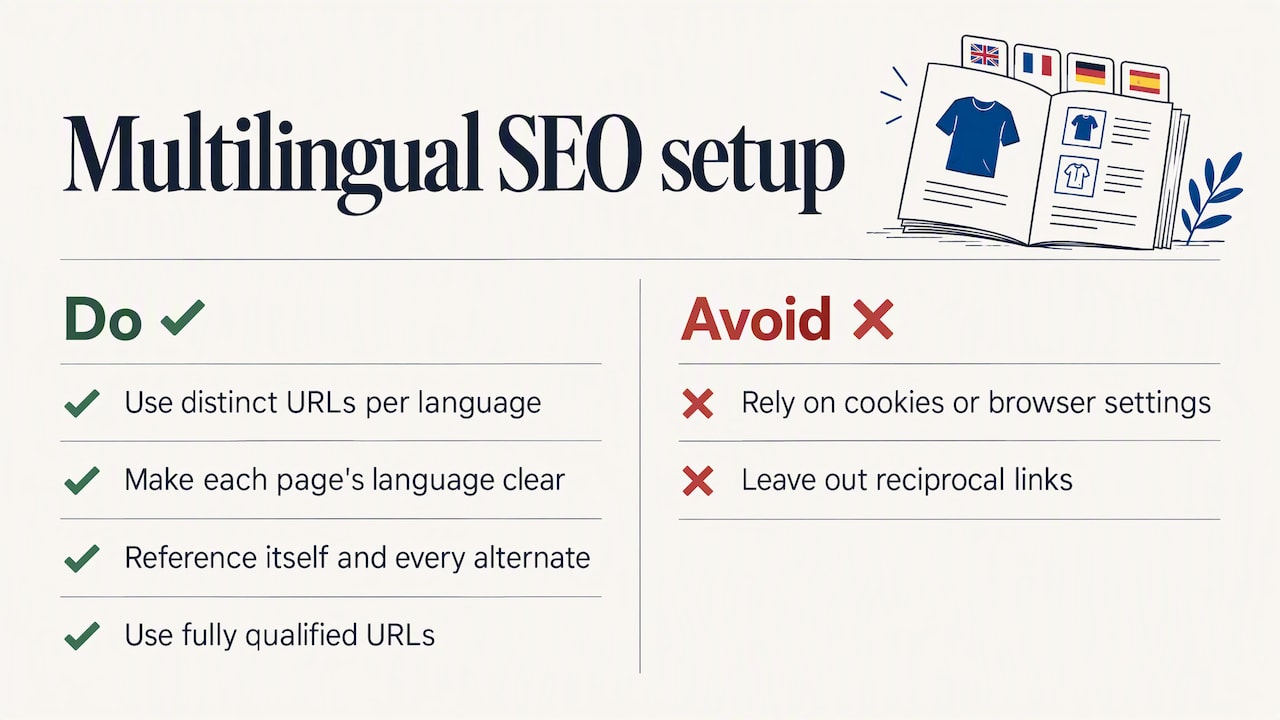
Many Italian stores also sell in English, German or French. Google’s Italian guidance recommends distinct URLs for each language version rather than cookies or browser settings, because variants that change dynamically may not all be crawled. Make the language of each page clear in its visible content too.
Then declare the relationships with hreflang. Google supports three equivalent ways: HTML, HTTP headers or XML sitemaps. Whichever you choose, each version must reference itself and every alternate, using fully qualified URLs, and missing reciprocal links can cause the annotations to be ignored. On a catalog with thousands of products, the sitemap method is usually easier to maintain.
For a store selling only in Italy, none of this applies. Keep one language, one set of URLs and spend the effort on content.
Speed and Core Web Vitals
Slow pages lose shoppers before SEO matters. Google’s current targets are LCP within 2.5 seconds, INP below 200 milliseconds and CLS below 0.1. It also recommends monitoring them in Search Console, where the report reflects real-user performance.
On WooCommerce, the usual causes of poor scores are:
- oversized product images and sliders on the home page;
- too many plugins loading scripts on every page;
- a cheap shared server with slow response times;
- no caching, or caching that is bypassed on category pages;
- cart fragment requests and third-party widgets (chat, tracking, reviews) loading early.
Work through them one at a time and re-measure. Our article on website speed for SMEs with ERP and e-commerce goes deeper on the causes and fixes.
Our perspective: the data behind the store
Most WooCommerce SEO advice stops at the website. In our work with small and medium businesses, the problems that hurt rankings often start in the management system. Titles, descriptions, prices and stock levels are typed twice, once in the ERP and once in the store, and they drift apart. A product shows as available on the page while the warehouse has none. A price changes in accounting but not online, and the structured data now says something different from the page.
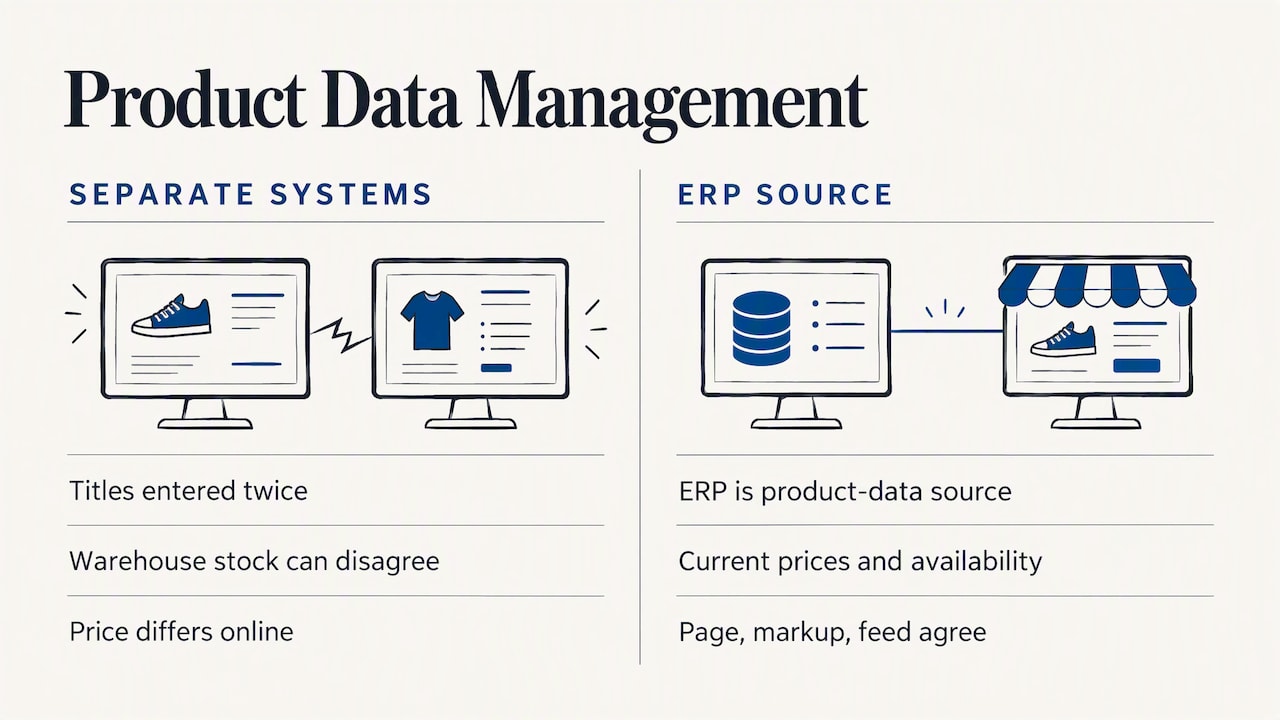
That is why we connect the two systems instead of treating the store as a separate project. When the ERP is the single source of product data, the store always shows current prices and availability, and Google sees consistent information in the page, the markup and the feed. We have 30 years of experience in management software and hold the Specialist certification, and every client has one dedicated consultant who learns how the business actually runs, rather than a call center that sees a new ticket each time.
Our advice: before you pay for more content or links, check whether your product data is accurate, complete and the same everywhere. It is less glamorous than a campaign, but it is the base everything else rests on.
— Claudio
Measure what works
Search Console’s Performance report shows clicks, impressions, click-through rate and average position, with breakdowns by page, country and device. A simple monthly routine:
- Filter by country: Italy, to separate your real market from stray traffic.
- Sort by page type: compare category pages and product pages separately.
- Look for pages with many impressions but a low click-through rate. Their titles and descriptions need work.
- Look for queries ranking in positions 8 to 15. A better description or more internal links can push them onto the first page.
- Match the changes to revenue in your analytics and in the store’s order data, so you track sales and not just visits.
SEO results build over months, not days. Change one thing at a time where you can, and record the date, so you know what moved the numbers.
When to ask for help
If your store is connected to an ERP, or you plan to connect it, SEO, data and hosting decisions affect each other. At LINKWARE we configure management software, integrate it with WooCommerce and PrestaShop, and handle e-commerce creation, hosting and web services with the same team. If you are starting from scratch, you can see how we approach professional e-commerce sites. Tell us about your catalog and we will show you how the pieces can work together in a demo built around your business.
For a broader overview of search strategy for small businesses, read our guide to SEO for Italian SMEs.
FAQ
Do I need an SEO plugin for WooCommerce?
It is not strictly required, but most stores benefit from one. A plugin makes it easy to edit meta titles and descriptions, generate sitemaps, manage breadcrumbs and extend structured data. Choose one and use it fully, and avoid running two that both output markup, because duplicate schema creates conflicts.
How long does WooCommerce SEO take to show results?
There is no fixed timeline. Technical fixes can show up in Search Console within weeks once Google recrawls the pages, while content and ranking gains usually build over several months. Track clicks and average position by page to see the trend.
Should I add product schema manually?
Usually not. WooCommerce and SEO plugins generate Product markup automatically. Your job is to check that the output is complete, matches the visible page and sits in the initial HTML, and to test it in Search Console’s Rich Result Status report. Manual code makes sense only when you have custom product types the defaults do not cover.
How do I optimize WooCommerce category pages?
Give each category a unique intro written for shoppers, a shallow and logical hierarchy, breadcrumbs and links to subcategories and top products. Decide which filtered URLs deserve to be indexed, and keep thin tag pages out of the index.
Does hreflang matter if I sell only in Italy?
No. Hreflang is for sites with multiple language or regional versions. If you serve only Italian shoppers, one language and one set of URLs is enough, and your effort is better spent on category content and product data.
Recommended
Vuoi digitalizzare la tua azienda?
Un consulente LINKWARE ti propone la soluzione su misura, senza impegno.
Richiedi una demo gratuita