
Blog · Gestionale
SSL and PCI DSS for E-commerce: What Your Online Store Needs

SSL (today TLS) and PCI DSS are not the same thing, and one does not replace the other. TLS encrypts the connection between your customer’s browser and your server. PCI DSS is the security standard that applies to anyone who stores, processes or transmits card data. An Italian online store needs both: a correctly configured certificate on every page, and a PCI DSS validation that matches the way your checkout takes payments. If you run WooCommerce collegato al gestionale, the second part depends on your payment gateway, your hosting and the plugins you load on the checkout page.
TL;DR
- “SSL” is the old name. SSL is obsolete and has been replaced by TLS, which is what your certificate actually uses today (Stripe documentation).
- A padlock does not make you PCI compliant. PCI DSS covers how you handle, or avoid handling, cardholder data, and it applies even when you outsource payments (PCI Security Standards Council).
- With WooCommerce, compliance is the store owner’s responsibility. A hosted gateway can reduce your scope significantly, but it does not remove it (WooCommerce documentation).
- In Italy, add Strong Customer Authentication under PSD2 to your checklist (Banca d’Italia).
Table of Contents
- SSL, TLS and PCI DSS: two different jobs
- What an Italian store must have on the TLS side
- Does a WooCommerce store have to comply with PCI DSS?
- How your payment method sets your validation route
- PCI DSS 4.0: scripts on your payment page
- Steps for a WooCommerce merchant
- Managing your providers: Requirement 12.8
- Italy and the EU: PSD2 and Strong Customer Authentication
- Our perspective
- Bring hosting, store and ERP under one team
- FAQ
SSL, TLS and PCI DSS: two different jobs
The confusion starts with vocabulary. Hosting companies still sell “SSL certificates”, but the protocol behind them is TLS. Stripe’s documentation explains that TLS is the secure transmission process between client and server, that it was originally carried out through SSL, and that SSL is now obsolete. The word “SSL” survives in everyday language for the same data-protection function (Stripe).
The PCI Security Standards Council describes the technical role precisely. SSL/TLS encrypts a channel between two endpoints, for example a web browser and a web server, to provide privacy and reliability of the data sent over it. The digital certificate adds authentication between browser and server, so you get both encryption and identity (PCI SSC, Securing eCommerce).
PCI DSS is wider. It is a standard for entities that store, process or transmit cardholder data. Encryption in transit is one piece of it. Others are how you configure servers, how you manage third-party providers, how you control access, and, since version 4.0, how you protect the scripts on your payment page.
| SSL/TLS certificate | PCI DSS | |
|---|---|---|
| What it is | A protocol and a certificate that encrypt and authenticate a connection | A security standard for handling card data |
| What it protects | Data in transit between browser and server | The whole card-payment environment, including people, processes and providers |
| Who checks it | Browsers, and you through a configuration test | Your acquirer or payment processor, through a questionnaire or scans |
| Is it enough alone? | No | Not without a secure transmission layer |
What an Italian store must have on the TLS side
The baseline has moved. The PCI Council’s information supplement on migrating from SSL and early TLS states that, from PCI DSS v3.1, SSL and early TLS are no longer examples of strong cryptography, that new e-commerce websites must not use or support them, and that migrations were due by 30 June 2018 (PCI SSC, Italian edition).
Stripe’s guide, last updated in August 2026, puts today’s position simply: TLS 1.2 is the baseline, TLS 1.3 is increasingly the practical default, and SSL and TLS 1.0 and 1.1 are prohibited (Stripe).
In practice, check these points:
- Protocol versions. Your server should offer TLS 1.2 or higher and nothing older. Payment pages must use TLS 1.2 or higher to reduce the risk of man-in-the-middle attacks (Stripe).
- Mixed content. Every resource on the page, including JavaScript, CSS and images, has to be served over TLS. A single insecure script produces browser warnings at the worst possible moment, right at checkout.
- Certificate validity. A certificate that expires silently takes the shop down for customers. Renewal needs an owner and a calendar, or automation.
- Configuration test. Qualys SSL Labs offers a server test that shows whether your TLS configuration is secure; Stripe’s documentation recommends it for that purpose (Stripe).
- Coverage. WooCommerce recommends SSL on checkout and account pages at the least (WooCommerce). Serving the entire site over HTTPS removes the risk of leaving one page out.
The certificate itself can come from different issuers. Stripe’s documentation names Let’s Encrypt, DigiCert and NameCheap as reputable examples. What matters more than the issuer is that it is installed correctly, renewed on time and paired with a server configuration that rejects old protocols. With our managed hosting, that server layer sits with the same team that looks after your site.
Does a WooCommerce store have to comply with PCI DSS?
Yes. WooCommerce’s own documentation states that PCI DSS compliance is the store owner’s responsibility, and that a site accepting card payments, even through a hosted gateway, falls within PCI DSS scope (WooCommerce).
The PCI Council says the same about outsourcing. PCI DSS applies to any entity that stores, processes or transmits cardholder data, whether it does so directly or through a third-party service provider. Merchants that outsource all payment processing still have to validate compliance, typically through a Self-Assessment Questionnaire such as SAQ A (PCI SSC FAQ).
What changes with a hosted gateway is the size of the job. If your store uses a gateway that processes payments off-site or through hosted fields, such as Stripe, PayPal or WooPayments, the site does not directly handle raw card data. PCI DSS still applies because your site serves the checkout page, but the scope can be much smaller (WooCommerce).
How your payment method sets your validation route
The way card data reaches the processor decides which questionnaire fits. The three you will hear about are SAQ A, SAQ A-EP and SAQ D.
- SAQ A fits stores where all card data entry is on the provider’s side. WooCommerce’s documentation for its Stripe extension explains that card data is collected through Stripe Elements, a Stripe-hosted interface embedded by iframe. Stripe, certified as a Level 1 Service Provider, is the only entity that handles card data, and most merchants using the extension can validate through SAQ A. Stripe may require a different SAQ type, or one signed by a Qualified Security Assessor, depending on the merchant’s PCI level (WooCommerce).
- SAQ A-EP applies to setups where your own website influences how the payment data is sent, for example when your page builds the payment form that posts to the processor. It carries a far heavier list of requirements, including vulnerability scanning, secure development practices, change management and web application security.
- SAQ D is the broadest route and applies where the merchant stores, processes or transmits card data in its own environment.
The practical rule: the less your server touches card data, the lighter your validation. WooCommerce recommends not storing card data on the site or server at all (WooCommerce). Stripe’s guide for Italian stores gives the same advice (Stripe).
Your acquirer or payment processor has the final word. The PCI Council recommends that merchants consult their acquirers or payment brands directly to find out which validation and reporting methods apply to them (PCI SSC, Securing eCommerce). WooCommerce notes that processors often enforce compliance by asking merchants to complete a questionnaire or to pass scans by an approved scanning vendor (WooCommerce).
PCI DSS 4.0: scripts on your payment page
A store that uses an iframe from its gateway is not automatically safe. Attacks of the Magecart type inject malicious JavaScript into a compromised merchant website to capture card data before it reaches the processor. PCI DSS v4.0 added two requirements aimed at this risk, effective after 31 March 2025:
- Requirement 6.4.3: minimize the attack surface and manage all JavaScript on the payment page.
- Requirement 11.6.1: detect tampering or unauthorized changes to the payment page and generate an alert.
For SAQ A merchants, 6.4.3 applies to the page that provides the payment provider’s page URL, and 11.6.1 applies to merchants that embed a provider’s iframe payment form (Jscrambler white paper on PCI DSS v4).
For a WooCommerce owner this has a clear consequence. Every plugin, tracking pixel, chat widget and A/B testing script on the checkout is a script you have to know about and justify. Keep an inventory of what loads on the payment page, remove what has no business reason to be there, and have a way to be alerted when something changes. Confirm the current wording of both requirements with your acquirer or in the PCI Council’s document library when you prepare your questionnaire.
Steps for a WooCommerce merchant
WooCommerce’s guidance gives a solid checklist (WooCommerce). Here it is in working order, with where each step usually goes wrong.
- Choose hosting built for PCI. WooCommerce recommends a secure, PCI-aware hosting provider. Shared hosting with outdated PHP and no isolation is where many problems begin. We run managed hosting with services delivered on cloud or dedicated servers in Italy, including server management and technical maintenance, so the infrastructure questions go to one team.
- Enable HTTPS everywhere. Install the certificate, redirect all HTTP traffic, fix mixed content, and run a TLS test. It goes wrong when a theme or plugin hard-codes an
http://resource. - Use a hosted payment method. Use a gateway that collects card data on its own infrastructure, through redirect or hosted fields. Do not store card numbers in orders, logs, notes or exported files.
- Lock down access. Strong passwords and limited admin access. Remove accounts of former staff and agencies. Our guide on WooCommerce security checks goes through the account and plugin side in detail.
- Keep everything updated. WordPress, WooCommerce, themes and plugins. Updates on a store with an ERP link deserve a test first, because a broken sync is as costly as a vulnerability. Our guide to WooCommerce and ERP integration explains how the two systems exchange orders and stock.
- Run regular ASV scans. If your processor requires them, schedule scans by an approved scanning vendor and keep the reports.
- Add a WAF or intrusion detection. The PCI Council recommends a web application firewall (Requirement 6.6) or additional intrusion-detection technology (Requirement 11.4), given how often e-commerce sites change (PCI SSC).
- Complete and file your SAQ. Do it with the information from your acquirer, then repeat on the schedule it sets.
For a wider view of what a secure hosting environment includes, see our page on e-commerce hosting security.
Managing your providers: Requirement 12.8
Outsourcing the payment page does not outsource responsibility. The PCI Council’s FAQ says merchants remain responsible for making sure the provider is PCI DSS compliant, for keeping written agreements with it (Requirement 12.8.2), for monitoring its compliance status at least annually (12.8.4), and for clearly defining shared responsibilities (PCI SSC FAQ).
In PCI DSS v4.0.1, Requirement 12.8 spans five obligations: a current list of third-party service providers, written agreements, due diligence before engaging a new one, annual monitoring, and documentation of which requirements are managed by the provider, by you or shared (Patronusec). The same source clarifies that a questionnaire sent once and never followed up does not meet the annual monitoring requirement. A current Attestation of Compliance or equivalent is needed for each in-scope provider.
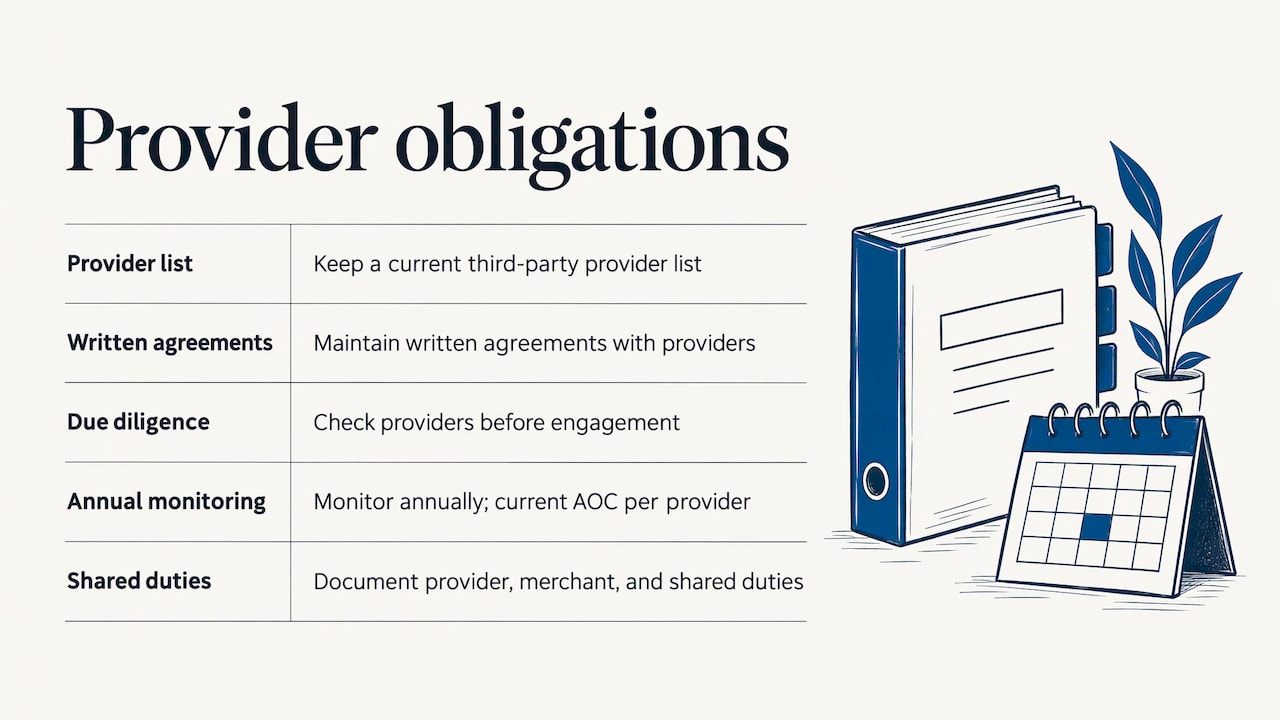
For a small store, this becomes a simple register: payment gateway, hosting provider, any agency with admin access, and the date you last collected each one’s attestation.
Italy and the EU: PSD2 and Strong Customer Authentication
PCI DSS is an industry standard, not Italian law. The legal layer for card payments in Italy is PSD2 (Directive 2015/2366/EU), transposed by d.lgs. n. 218/2017. Banca d’Italia’s guide to e-commerce payments explains that it requires Strong Customer Authentication for card transactions started by the customer, based on two or more elements from knowledge, possession and inherence. Payments up to 30 euros can be exempted regardless of fraud rate, but SCA is mandatory when the cumulative amount of previous electronic payments exceeds 100 euros or after five consecutive payments without it (Banca d’Italia).
The same guide notes that payment service providers must run internal controls to detect fraudulent payments, have their security measures reviewed periodically by independent auditors, and notify clients of serious security incidents. With a certified gateway, much of this sits on the provider’s side. Your job is to configure the checkout so the authentication flow works without friction.
Card data is also personal data, so the GDPR applies alongside. Our page on GDPR for e-commerce hosting covers what to verify in Italy.
Our perspective
We see TLS and PCI DSS handled as two separate tasks, with two separate owners: the certificate with the hosting company, the questionnaire with the owner. In an online store they are one system.
The certificate, the server configuration, the plugins, the gateway and the connection to the ERP all affect your scope. That is why we work with a dedicated consultant for each client, who studies how the business really runs, instead of a call center that sees a ticket at a time.
Our team handles development and user assistance internally. When we configure a WooCommerce store, connect it to the management system and host it on servers in Italy, the questions of who updates what and who answers when something changes have one answer.
Our advice is to reduce the scope first. Use a hosted payment method, keep card data off your systems, keep the list of scripts on checkout short, and write down your providers. Then validation becomes a routine task, not a yearly emergency.
Claudio
Bring hosting, store and ERP under one team
If you want the certificate, the hosting, the WooCommerce store and the link with your ERP handled by a single team, we can look at your setup together. We offer managed hosting, e-commerce creation, GDPR and privacy services, and ERP integration, each configured around how your company works.
Describe your store to us on our web services page and we will assign you a dedicated consultant.
FAQ
Is an SSL certificate enough to be PCI compliant?
No. The certificate encrypts the connection and authenticates your server, which is one technical control. PCI DSS covers the whole environment where card data is handled, and it applies even when a provider processes the payments for you (PCI SSC).
Which SAQ does a WooCommerce store usually use?
It depends on the payment integration. With the Stripe extension, which collects card data in a Stripe-hosted iframe, most merchants can validate through SAQ A, though Stripe may ask for a different type depending on the merchant’s PCI level (WooCommerce). Your acquirer or processor confirms the one that applies to you.
Which TLS version should my store support?
TLS 1.2 is the baseline and TLS 1.3 is increasingly the default. SSL and TLS 1.0 and 1.1 are prohibited (Stripe). Test your server configuration after any hosting change.
Do I need to store card numbers to manage orders?
No, and you should not. WooCommerce recommends keeping card data off the site and server, and Stripe’s guide for Italian stores gives the same advice (Stripe). Orders can carry the transaction reference from the gateway instead.
Does PSD2 replace PCI DSS?
No. They are separate. PSD2 is European law that requires Strong Customer Authentication for card payments started by the customer. PCI DSS is the industry standard for protecting card data. A compliant store addresses both (Banca d’Italia).
Recommended
Vuoi digitalizzare la tua azienda?
Un consulente LINKWARE ti propone la soluzione su misura, senza impegno.
Richiedi una demo gratuita