
Blog · Gestionale
ERP for Accounting Firms in Italy: What to Look For
An ERP for an accounting firm is a single system that connects your accounting work, your document archive, your client communication and your internal management. In Italy it also has to handle e-invoices through the SdI, retention rules and GDPR. The right choice depends less on the feature list and more on how your firm actually works: how many clients you serve, which documents you exchange, and who maintains the system once it is running. This guide covers what to check, what it costs and how to avoid the usual mistakes.
TL;DR
- A firm needs more than bookkeeping software: document management, a client portal and compliant retention of e-invoices are the parts that save the most time.
- Keeping a file on a PC is not legal retention. E-invoices must be retained under specific rules, and your ERP either handles this or connects to a service that does.
- Cloud and on-premise change who is responsible for security and backups under GDPR. Decide this before you compare features.
- Market prices run from about €15 a month for entry-level tools to €200-400 a month for structured firms, but support quality and scalability matter more than the license price.
- A dedicated consultant who knows your firm, and a test on your real workflows, are the best protection against a bad implementation.
Table of Contents
- ERP or accounting software: what is the difference for a firm?
- The four things a firm needs from an ERP
- Comparing the main options
- Cloud or on-premise: a GDPR decision as much as an IT one
- What it costs
- How to choose: a seven-step process
- Our perspective
- How Linkware can help
- FAQ
ERP or accounting software: what is the difference for a firm?
Most firms already run a bookkeeping and tax package. It covers journal entries, VAT, tax returns and filings. That is the core, and it works well for the accounting itself.
An ERP widens the scope. It joins accounting with the other data your firm and your clients generate: sales, purchases, inventory, payments, contracts, time and billing. For a firm, this matters in two situations:
- You manage the books of clients who run their own ERP or e-commerce. Data entry from invoices, orders and payments is the main cost of the engagement. An ERP that can exchange data with the client’s system removes most of it.
- Your firm itself has grown beyond a spreadsheet and a shared folder. You need to track deadlines, assignments, documents and billing across staff.
If neither applies, a good accounting package with a solid archive may be enough. If either does, you are in ERP territory, and the questions below apply.
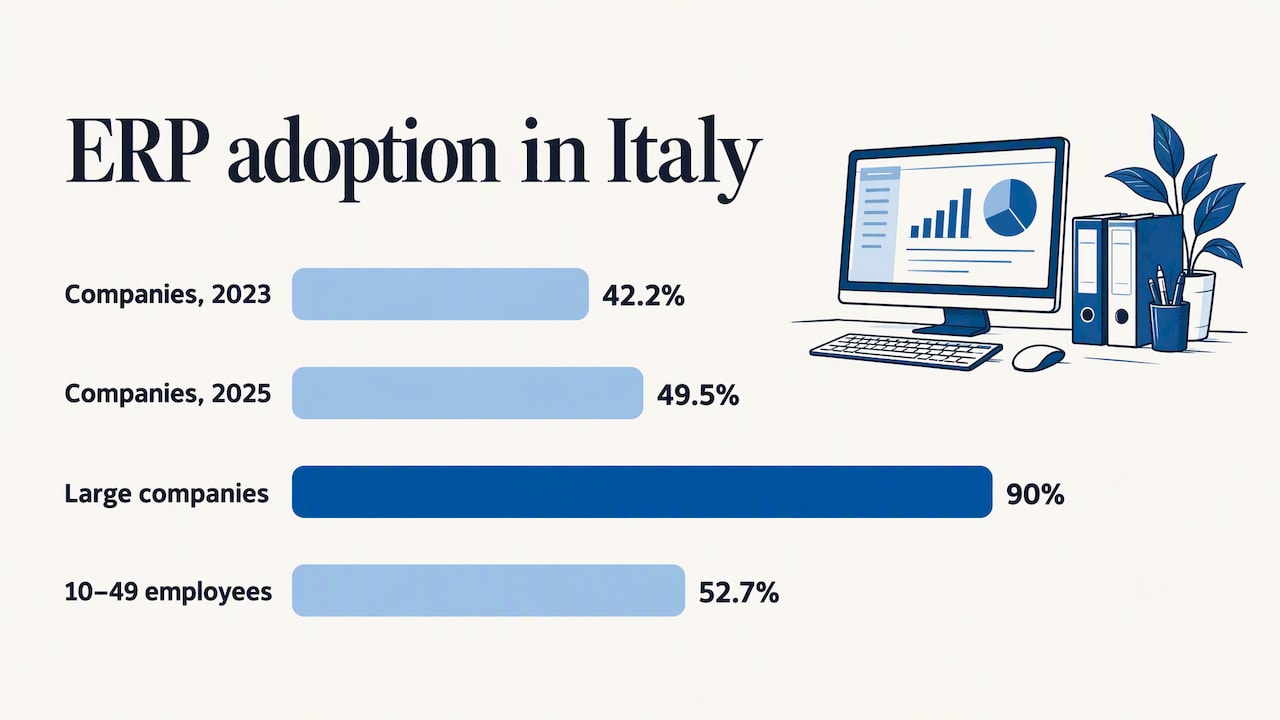
Adoption is already widespread. According to Istat’s 2025 ICT report, 49.5% of Italian companies with at least 10 employees use an ERP, up from 42.2% in 2023. The same report shows the gap by size: 90% among large companies against 52.7% among companies with 10 to 49 employees. Your clients are likely in that second group, which is why they increasingly expect their accountant to work with their systems.
The four things a firm needs from an ERP
1. Accounting and tax compliance
This is the baseline: chart of accounts, VAT, registers, withholding taxes, e-invoice flows with the SdI, and the reports your clients and the tax authorities expect. Check that the vendor updates the software when rules change, and ask how quickly. A system that needs manual workarounds for each regulatory change costs you hours every year.
If your clients sell online or abroad, add the specifics: the SdI connection from a web shop, Intrastat declarations, and payment reconciliation. Our guides on integrating the SdI with an e-commerce store, Intrastat in an ERP and payment reconciliation explain what each involves.
2. Document management
Document management is the most searched-for need around this topic, and with good reason. A typical firm receives invoices, bank statements, payslips, contracts and certificates in every format and through every channel: email, messaging apps, paper, USB sticks.
A useful document system does the following:
- Stores each document once, linked to the client, the period and the accounting entry it supports.
- Lets you search by client, date, supplier or amount.
- Records who uploaded, viewed or changed a file.
- Connects to the accounting module, so a received invoice becomes a posting without retyping.
- Applies access rights by role, so a junior assistant does not see the payroll of every client.
The last point is also a GDPR matter, covered below.
3. Retention of e-invoices
This is where many firms confuse two different things. Viewing or saving a file is not the same as legal retention. The Revenue Agency states that retention under the rules is a regulated process, not simply storing the invoice file on a computer, and it applies to both issued and received invoices under art. 39 of Presidential Decree 633/1972.
The practical points:
- The deadline is three months after the filing deadline of the annual VAT return for the relevant year.
- You can use the free retention service in the Agency’s “Fatture e Corrispettivi” portal, or a certified private provider.
- According to a specialist guide, the Civil Code (art. 2220) sets accounting records retention at 10 years from the last entry, and e-invoices follow the same horizon.
What to ask a vendor: does the ERP send documents to retention automatically, does it verify the outcome, and who is responsible if a batch is rejected? A clear answer to the last question tells you a lot about the vendor.
4. A client portal
A client portal replaces the email-and-phone loop. Your clients upload documents, see which ones are missing, download their own reports and sign off on requests. You stop chasing and they stop wondering.
What to look for:
- Request lists per period. The client sees what you need for the quarter and ticks it off.
- Direct link to the archive. An uploaded invoice lands in the right client folder, not in a shared inbox.
- Notifications that do not rely on personal email. Documents with personal data should not travel as attachments.
- Role-based access on the client side. The owner sees everything; the sales manager sees only what concerns sales.
- Your branding and your process. The portal is part of how clients perceive your firm.
A portal is only as good as its connection to the rest. A standalone upload tool just moves the retyping problem to another screen.
Comparing the main options
Without naming brands, there are four types of solution a firm typically considers:
| Option | Strengths | Limits | Best for |
|---|---|---|---|
| Entry-level cloud accounting tool | Low monthly cost, quick start | Few integrations, limited archive and portal | Very small firms with simple clients |
| Standard accounting suite for firms | Widely known, many users, familiar to staff | Fixed workflows, customization is hard | Firms whose processes match the standard |
| Full ERP configured to the firm | Accounting, documents, portal and client data in one place | Needs a proper implementation and training | Growing firms and firms serving clients with ERP or e-commerce |
| Custom-built software | Fits exactly | Higher cost, depends on a single developer | Rare cases with unusual requirements |
The third option is where custom configuration of an ERP pays off. It offers the flexibility of custom software without building from zero, but only if the configuration is governed: every change documented, tested and tied to a real need.
Cloud or on-premise: a GDPR decision as much as an IT one
Your firm processes sensitive data for many controllers at once: payroll, bank details, tax positions. How the ERP is hosted changes who is responsible for what.
The Italian data protection authority published a code of conduct for business software vendors. Read in context, it makes the following distinction:
- Cloud: the vendor usually acts as data processor under art. 28 of the GDPR, so you need a data processing agreement that defines security measures, backups and what happens when the contract ends.
- On-premise: physical and logical security of the infrastructure, including backups and restores, normally remains with you unless you agree otherwise in writing.
The same document stresses privacy by design and by default in business software. In practice, ask the vendor to show you access logs, role permissions and data export, not just to say that the product is compliant. Our article on what an ERP really needs for GDPR compliance lists the checks, and the comparison of cloud and on-premise ERP for Italian SMEs goes through the operating differences.
If you prefer not to run servers yourself but want a clear responsibility chain, a managed ERP hosting arrangement is a third path: the system stays dedicated to you while someone else handles the infrastructure.
What it costs
Prices vary widely and depend on users, modules and support. As a benchmark, a guide for accountants reports licenses of about €200 to €400 per month for structured firms, and entry-level or cloud-native solutions from roughly €15 a month or €200 a year for the smallest practices. Treat these as market ranges, not quotes.
The license is only part of the bill. Budget for:
- Configuration and data migration. Moving your clients’ history is rarely trivial.
- Training. Staff who are not trained fall back on their old habits within weeks.
- Support and maintenance. Compare what is included: who answers, how fast, and whether you speak to someone who knows your setup.
- Hosting and backup, if the system is not purely SaaS.
- Integrations with clients’ systems, banks or e-commerce platforms.
The same guide notes that price should not be the only criterion, and we agree: a cheaper system with weak support costs more when a deadline week goes wrong. Linkware does not publish prices for its services, because scope drives them. A scoped quote after an analysis of your workflow is the honest way to price it.
How to choose: a seven-step process
- Map your workflows. List how a document arrives, who touches it, where it ends up and how it is billed. Include the exceptions.
- Rank your pain points. Chasing documents, double entry, deadline tracking, retention? The top two decide your priorities.
- Define compliance requirements. SdI, retention, Intrastat, GDPR roles, access control.
- Decide the hosting model. Cloud, on-premise or managed hosting, with the responsibility consequences above.
- Test on your own data. Ask for a demo using one of your real clients’ scenarios, not a polished sample company.
- Check the vendor. Ask who will support you, whether development and assistance are handled by the same team, and for references from similar firms. Our list of questions and workshop topics for choosing an ERP partner is a good starting point.
- Plan the change. Migration dates away from peak deadlines, training before go-live, and a person in the firm who owns the project. See our notes on change management for ERP projects.
The skills gap is a real constraint. Istat’s report finds that a lack of specialist skills is the main brake on innovation: almost 60% of Italian companies that considered AI investments gave up because they lacked qualified in-house staff. The lesson for a firm is to choose a vendor who carries the technical load, rather than a system that assumes you have an IT department.
Our perspective
In thirty years of working on business software, we have seen the same pattern in professional firms. The system is rarely the problem. The problem is that it was installed by someone who never understood how the firm works, and the staff then work around it.
That is why we assign every client a single consultant who studies the processes and stays as the point of contact. No call center, no ticket that passes through four people. Development, configuration and user assistance are handled by our own team, so the person who hears your problem sits next to the person who can fix it.
For a firm, we would suggest this order of priorities:
- First, the document flow, because that is where hours disappear every week.
- Second, the client portal, once the archive is organized. A portal on top of a messy archive spreads the mess.
- Third, integrations with your clients’ systems, starting with the clients who generate the most data entry.
We would also advise against buying every module at once. Start with the workflow that hurts most, measure the result, then extend. An ERP that grows with the firm is easier to adopt than one that changes everything in a single weekend.
— Claudio
How Linkware can help
Linkware configures ERP software for professional firms, commerce and manufacturing, and integrates it with e-commerce platforms such as WooCommerce collegato al gestionale and PrestaShop. We are an authorized Passepartout partner in Turin, and we offer custom configuration, training and start-up, and professional support. If your clients also run online shops, we can connect their stores to the ERP so that accounting and sales sit in one system.
Want to see it on your own workflow? Request a free demo and tell us how your firm handles documents today. We will show you what a configured system looks like for your case. You can also read about our tailor-made ERP solutions on the main site.
FAQ
Does an ERP include accounting software?
Yes. Accounting is normally the core module of an ERP, covering the general ledger, VAT and e-invoicing. What an ERP adds is the connection to sales, purchasing, inventory, documents and reporting. For a firm, the value is in sharing data with clients’ systems and managing documents in one place.
Do I need a separate system for retention of e-invoices?
Not necessarily. You can use the free service of the Revenue Agency’s portal, a certified private provider, or an ERP that sends documents to a certified provider automatically. Whatever you choose, check that the process is regulated and that you can prove it was completed within the deadline.
Is a client portal safe for sending sensitive documents?
It is safer than email attachments if it has access control by role, activity logs and encrypted transfer. Ask the vendor to define in the contract who is the data processor and where the data is stored. Your data protection adviser should review the agreement before you move client documents.
Cloud or on-premise for a small firm?
For most small firms, cloud or managed hosting is simpler, because backups, updates and security are handled by the provider under a defined agreement. On-premise makes sense if you have internal IT skills and specific constraints, but then backups and restores are your responsibility. Compare both against your staff and your risk, not only against price.
Recommended
Vuoi digitalizzare la tua azienda?
Un consulente LINKWARE ti propone la soluzione su misura, senza impegno.
Richiedi una demo gratuita