
Blog · Gestionale
ERP Requirements Checklist for Italian SMEs

An ERP requirements checklist is a structured list of what your company needs the system to do, ranked by importance, so that vendors can answer it and you can compare them on the same terms. For an Italian SME the list should cover seven areas: processes, accounting and compliance, integrations, data, technology and hosting, users and support, and the vendor. Below you will find each area with the questions to ask, a way to score the answers and a template you can copy into a spreadsheet.
TL;DR
- Start from your processes, not from a feature list: write down how orders, purchasing, production, invoicing and collections actually work today.
- Rank every requirement as must-have, important or nice-to-have, and keep the must-haves to a number a vendor can truly demonstrate.
- Include Italy-specific items: electronic invoicing through the SdI, VAT and accounting rules, and where data is hosted.
- List integrations (e-commerce, marketplaces, CRM, warehouse, shop floor) and data migration as requirements, not as afterthoughts.
- Turn the checklist into a scored RFP and ask vendors to demonstrate your own scenarios, not a generic demo.
Table of Contents
- Why a written checklist matters
- Step 1: Map your processes before listing features
- Step 2: The checklist by area
- Step 3: Rank and weight requirements
- Step 4: A template you can copy
- Step 5: Turn the checklist into an RFP
- Common mistakes
- Our perspective
- How Linkware can help
- FAQ
Why a written checklist matters
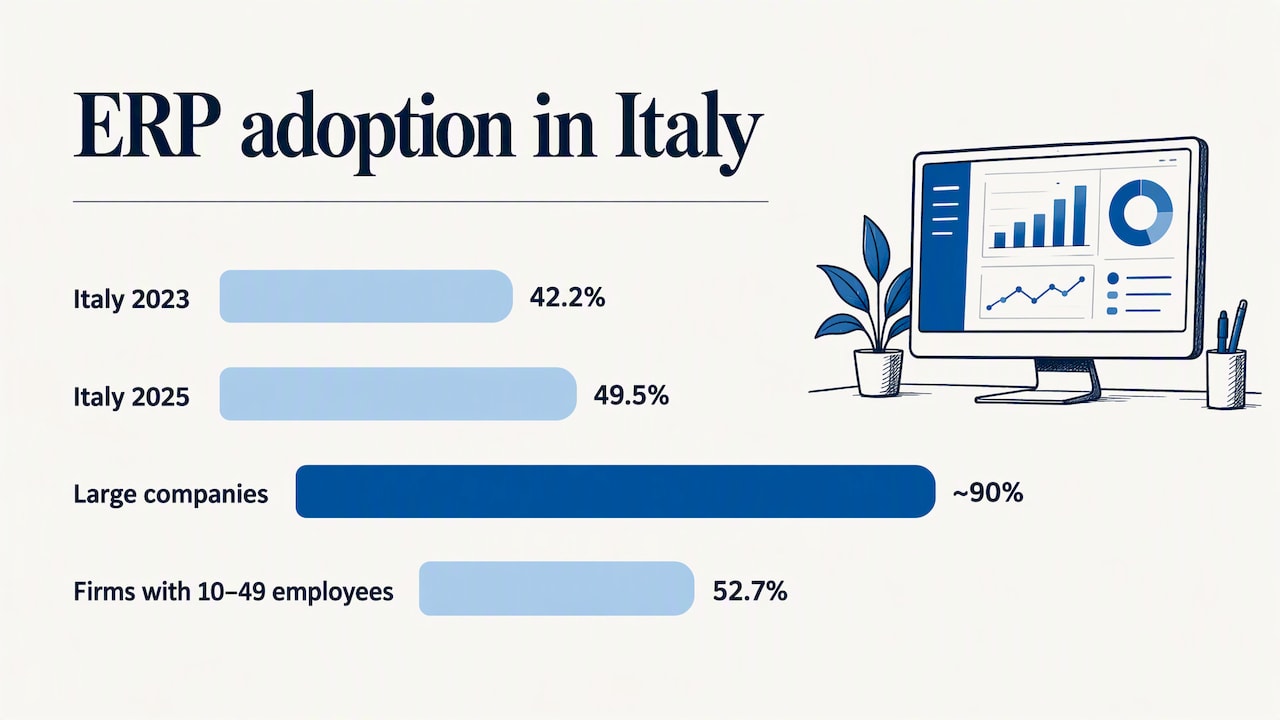
ERP adoption in Italy is growing. According to ISTAT’s 2025 report on enterprises and ICT, 49.5% of Italian companies with at least 10 employees used an ERP in 2025, up from 42.2% in 2023. The same report shows a clear size gap: about 90% of large companies have one, against 52.7% of firms with 10 to 49 employees. ISTAT’s press release adds that ERP use is tied to organizational complexity, not only to headcount.
That last point is useful for you. Whether you need an ERP depends on how many processes you must keep aligned: sales, stock, production, accounting, collections. A checklist forces you to describe that complexity before a vendor describes it for you.
Without a written list, three things tend to happen. Demos follow the vendor’s script, not your operations. Customizations appear after the contract is signed. And the people who will use the system daily find out what is missing only after go-live.
Step 1: Map your processes before listing features
Before you open any template, spend a few days with the people who do the work. For each core process, write down:
- Who starts it and what triggers it (a customer order, a stock threshold, a supplier invoice).
- Which tools are used today (spreadsheets, email, a legacy management system, a website back office).
- Where data is typed twice.
- Where delays, errors or disputes occur.
- What reports management needs and how often.
The output is a short process map for each area. Every pain point on it becomes a candidate requirement. A requirement such as “the system must update available stock on the website when a warehouse movement is posted” is far more useful than “inventory management”.
If you want a broader framework on this stage, our guide on how to choose a management system covers the decision from the business side, and the one on ERP for SMEs covers the typical scope.
Step 2: The checklist by area
Use the lists below as a base. Delete what does not apply and add what is specific to your sector.
Accounting, tax and compliance
- General ledger, chart of accounts and cost centers that match your reporting needs.
- Accounts receivable and payable, with due-date schedules and payment follow-up. See our note on managing customer and supplier due dates.
- VAT ledgers, periodic VAT settlements and the other Italian tax obligations your accountant handles.
- Issuing, sending and receiving electronic invoices through the Sistema di Interscambio (SdI), with handling of rejections.
- Fixed assets and depreciation, if relevant.
- Role-based access and an audit trail of who changed what.
- Data protection: how personal data is processed and who the processor is, in line with GDPR.
On electronic invoicing, check the details with your accountant. The Agenzia delle Entrate explains in its FAQ that the SdI delivers the invoice to the electronic address (PEC or recipient code) written in the invoice itself, so the correct handling of that field belongs on your list. If you also sell online, read how to integrate the SdI with an e-commerce and ERP without rejections.
Sales, purchasing and inventory
- Quotes, sales orders, delivery notes and invoicing in a single document flow.
- Price lists, discounts and customer-specific conditions.
- Purchase requests, orders and receipt against order.
- Multiple warehouses, locations, minimum stock and reorder points.
- Lot and serial number traceability, if your products need it. We describe how to retrieve lot and serial data in hours.
- Barcode or handheld scanning for goods receipt and picking. For larger logistics operations, a dedicated WMS for warehouse logistics may be part of the scope.
- Agent and sales-rep access from mobile devices, if you work with agents.
Production (for manufacturers)
- Bills of materials with multiple levels and variants.
- Work orders, routings and capacity planning.
- Material requirements planning and subcontracting (conto lavoro).
- Real-time shop-floor data collection: times, quantities, scrap. A MES for Industry 4.0 and 5.0 can feed this back to the ERP.
- Product costing, planned versus actual.
E-commerce and marketplaces
- Which platform you use (for example WooCommerce or PrestaShop) and which side is the master for products, prices, stock and customers.
- Order import into the ERP, with automatic customer creation and correct tax treatment.
- Stock and price synchronization back to the shop, with a stated frequency.
- Shipping status, returns and credit notes.
- Marketplace connections and how orders are consolidated. See our guide on marketplace integration with the ERP.
The scale of online selling is still modest among Italian firms: ISTAT reports that 15.3% of companies with 10 or more employees sell online to final customers. If you are in that group, the integration requirements deserve a heavy weight in your scoring.
CRM, reporting and analytics
- Contact and opportunity management, linked to orders and invoices.
- Dashboards for sales, margins, stock and cash flow, available without an IT specialist.
- Export to spreadsheets and connection to a business intelligence tool.
- Alerts on overdue invoices, low stock or delayed orders.
Technology, hosting and security
- Deployment model: cloud, on-premise or hosted by the vendor. Our comparison of ERP cloud and on-premise for Italian SMEs lists the trade-offs, and the page on managed ERP hosting explains when a managed option fits.
- Where data and backups are physically stored, and under whose responsibility.
- Backup frequency, restore tests and recovery time.
- Authentication, access profiles, and remote access method (for example VPN).
- Open interfaces (APIs) and documented integration methods.
- Upgrade policy: who applies updates, when, and what happens to customizations.
If a public administration is among your customers or you are evaluating a cloud provider for public-sector work, note that AgID’s cloud pages state that since 19 January 2023 the qualification process for providers serving the public administration has passed to the National Cybersecurity Agency. For a private SME this is not mandatory, but it shows which authority sets the benchmark.
Users, training and support
- Number and type of users (full, occasional, read-only), and the licensing consequences.
- Training format, duration and who delivers it.
- Who answers when something breaks: a named contact or a ticket queue, and response times.
- Documentation in Italian.
- A plan for change management in the teams that will use the system.
Data migration
- Which data moves: customers, suppliers, items, open orders, opening balances, history.
- Who cleans the data and by when.
- How many test migrations are included and how errors are reported.
This area is often underestimated. Our operational guide to ERP data migration shows how to split the work between you and the vendor.
Step 3: Rank and weight requirements
A list of 200 lines with the same priority is useless. Give each requirement one of three labels:
| Label | Meaning | Effect on selection |
|---|---|---|
| Must-have | The business cannot operate without it, or the law requires it | A “no” disqualifies the vendor |
| Important | Saves significant time or reduces risk | Weighted in the score |
| Nice-to-have | Useful, but you can work without it | Tie-breaker only |
Then add a vendor response column with four standard answers:
- Standard: works out of the box.
- Configuration: achieved by settings, with no code.
- Customization: requires development, with cost and effect on upgrades stated.
- Not available.
The difference between configuration and customization is where many budgets slip. Before accepting a customization, read when ERP customization makes sense and how to govern it.
Step 4: A template you can copy
Build a spreadsheet with these columns:
| ID | Area | Requirement (one sentence) | Process owner | Priority | Vendor answer | Demo required (Y/N) | Cost note | Score 0-5 |
|---|---|---|---|---|---|---|---|---|
| ACC-01 | Accounting | Receive supplier e-invoices via SdI and post them automatically | Finance | Must-have | Y | |||
| SAL-04 | Sales | Apply customer-specific price lists on web orders | Sales | Important | Y | |||
| INV-07 | Inventory | Track lots from receipt to shipment | Warehouse | Must-have | Y | |||
| ECO-02 | E-commerce | Sync available stock to the shop every few minutes | IT | Must-have | Y | |||
| TEC-03 | Technology | Restore from backup within a stated time | IT | Important | N |
Keep each requirement to a single testable sentence. If a vendor cannot answer it with yes, no or a scenario, rewrite it.
Step 5: Turn the checklist into an RFP
The same document works as the core of a request for proposal. A usable RFP has:
- A one-page company profile: sector, headcount, sites, turnover range, current systems.
- The scope: which processes are in and which are out.
- The requirements table above.
- Three to five real scenarios to demonstrate (for example: a web order with a partial shipment and a credit note, from order to SdI invoice).
- Questions on implementation: timeline, team, responsibilities, acceptance criteria.
- Commercial structure: licenses, implementation fees, maintenance, hosting, and what is billed separately.
- A deadline and a single point of contact on your side.
Send it to a small number of vendors, three to five. More than that produces comparison work without better decisions. To verify the supplier itself, use the questions in our guide on verifying an ERP partner, and for the later phases see the ERP implementation phases.
Common mistakes
- Copying a generic list. A downloaded list of 50 features describes an average company, not yours.
- Letting one department write it. Finance, sales, warehouse, production and IT each see different gaps.
- Treating integrations as phase two. If your shop or marketplace is a major sales channel, it is a must-have from day one.
- Ignoring the cost of ownership. Ask for license, hosting, maintenance and upgrade costs over several years, not only the first quote.
- Skipping a reference check. Ask for a customer in your sector and size, and speak to them.
Our perspective
In our experience at Linkware, the checklist is less about the list and more about the conversation it forces. When a company writes down how an order really travels from customer to invoice, the right scope becomes visible, and so do the processes that should change before any software is installed.
We work with a dedicated consultant for each client, someone who learns the business instead of routing questions through a call center. That is why we ask clients to describe processes first, then we configure the system around them. Development and user assistance are handled by our own team, so what is agreed in the requirements is what the people who build and support it have read.
Our advice: keep your must-haves few and testable, and ask every vendor, us included, to demonstrate your scenarios on your data. If a requirement cannot be shown, treat it as a risk.
— Claudio
How Linkware can help
If you already have a draft list, we can review it with you and show how it maps to a configuration of ERP software. We implement ERP solutions on the Passepartout platform, integrations with WooCommerce and PrestaShop, and related services such as managed hosting. You can see what we offer on the Linkware site, look at LINKWARE ONE, or contact us to request a demo based on your own processes.
FAQ
How many requirements should an ERP checklist contain?
There is no fixed number. For a typical SME, 60 to 120 well-written requirements across the areas above is workable, with no more than a few dozen marked as must-have. If vendors cannot demonstrate all must-haves in a half-day session, the list is too long.
Who should be involved in writing the requirements?
One owner per process: finance, sales, purchasing, warehouse, production and IT, plus management for reporting needs. Involve your accountant for tax and invoicing items. A single project lead consolidates the list and settles priority disputes.
What is the difference between an ERP requirements list and an RFP?
The requirements list says what you need. The RFP wraps it with company information, scenarios to demonstrate, implementation questions and commercial terms, so vendors can respond in a comparable format. In practice, the list is the main attachment of the RFP.
Should e-commerce integration be a must-have?
If online sales are a meaningful share of your revenue, yes. Specify which system owns products, prices and stock, how often data synchronizes, and how orders and invoices flow to the SdI. A vendor that treats this as a custom extra should state the cost and upgrade impact in writing.
Is cloud or on-premise a requirement or a result?
It is better treated as a result of your requirements on security, remote access, backups and internal IT capacity. Write those needs down first, then let vendors propose a deployment model that meets them.
Recommended
Vuoi digitalizzare la tua azienda?
Un consulente LINKWARE ti propone la soluzione su misura, senza impegno.
Richiedi una demo gratuita