
Blog · Gestionale
WooCommerce ERP Integration: A Practical Guide for Italian Businesses
Integrating l'integrazione con WooCommerce with an ERP means that orders, stock levels, prices, customers and invoices move between your online store and your management software automatically, with one system in charge of each type of data. For an Italian business, the integration also has to produce correct electronic invoices and clean VAT records. This guide explains the integration approaches, what to synchronize, how to run the project from mapping to launch, and what to do when synchronization breaks.
TL;DR
- Choose the approach by volume and complexity: a ready-made connector for standard flows, an API-based integration for custom rules, middleware when you connect several channels.
- Decide the “source of truth” for each data type before you write a single rule. Typically the ERP owns products, stock and accounting, while WooCommerce owns the web order until it is accepted.
- In Italy, check invoicing through the SdI, VAT registers, tax codes and the Italian-format fields at checkout before launch, not after.
- Test with real edge cases (refunds, partial shipments, foreign customers), then monitor the sync daily with logs and alerts.
- A dedicated consultant who knows your processes shortens the project more than any plugin does.
Table of Contents
- What a WooCommerce and ERP integration actually does
- Choosing the integration approach
- Who controls which data: deciding the source of truth
- Step by step: from mapping to launch
- Italian compliance: what to check before going live
- Monitoring and troubleshooting
- Our point of view
- How Linkware can help
- FAQ
What a WooCommerce and ERP integration actually does
WooCommerce is a store: it takes the order, the payment and the shipping choice. An ERP (in Italian, a gestionale) is where the company runs accounting, warehouse, purchasing, production and invoicing. Without a link, someone re-types every web order into the ERP, updates stock by hand and issues invoices separately. That works at five orders a day. At fifty, errors and delays begin to cost money.
A working integration synchronizes these flows:
- Orders from WooCommerce to the ERP, with customer, items, discounts, shipping and payment method.
- Order status back from the ERP to the store: processing, shipped, invoiced, with tracking numbers.
- Stock levels from the ERP to the store, so you do not sell what the warehouse no longer has.
- Products and prices from the ERP to the store, including price lists and variants.
- Customers in both directions, with tax data (partita IVA, codice fiscale, SdI code or certified email) kept intact.
- Accounting records: invoices, credit notes and payment reconciliation.
The business problems it solves are mostly operational: double data entry, overselling, late invoices, mismatched customer records and no single view of margins. A published case study on Innoliving, an Italian company, describes correcting addresses before they reach the ERP and consolidating orders from more than 50 retail stores and platforms; the company reports saving nearly 3,500 hours. Treat that as one vendor’s reported result, not a benchmark for your store, but it shows where the time goes: in cleaning and consolidating data, not in the transfer itself.
Choosing the integration approach
There are four common ways to connect WooCommerce to an ERP. The right one depends on your order volume, how unusual your rules are and how many sales channels you run.
| Approach | Best for | Strengths | Limits |
|---|---|---|---|
| Ready-made connector or plugin | Standard flows, low to medium volume | Fast to start, lower upfront cost | Fixed field mapping, limited custom logic |
| Custom API integration | Specific pricing, bundles, B2B rules | Exactly fits your processes | Needs development and maintenance |
| Middleware (integration platform) | Several channels: store, marketplaces, other sites | One hub, reusable flows | Another system to run and monitor |
| Manual CSV import and export | Very low volume, temporary | No development | Slow, error-prone, not real time |
Connector or plugin
A connector is the quickest route when your ERP already has one for WooCommerce and your processes are standard: simple products, one warehouse, one price list. The weak point is flexibility. If you sell by the box and the piece, apply customer-specific price lists or manage production-to-order items, check that the connector handles them before you commit.
Custom integration through the API
WooCommerce exposes a REST API and webhooks, including events such as order created and order updated. That makes it possible to push an order to the ERP the moment it is placed, instead of polling every few minutes. A custom integration is the right choice when business rules are the heart of the project: wholesale pricing, credit limits, split shipments or products that depend on stock in several locations.
Middleware
If WooCommerce is one of several channels, a middleware layer normalizes orders from all of them before they enter the ERP. It adds a component to maintain, but avoids building the same mapping three times. If you also sell on marketplaces, see our guide to marketplace and ERP integration.
How to decide
Ask four questions:
- How many orders per day do you expect in twelve months, including peaks?
- Do you have prices, discounts or products that a standard connector cannot express?
- Is WooCommerce your only channel?
- Who will fix it when it fails, and how fast?
The last question matters most. A cheap connector without anyone accountable for it becomes expensive the first time orders stop flowing on a Friday evening.
Who controls which data: deciding the source of truth
Most failed integrations have the same cause: both systems can edit the same field, and each overwrites the other. Assign one owner per data type.
| Data | Recommended master | Direction | Notes |
|---|---|---|---|
| Product code, description, cost | ERP | ERP to store | Store may add web-only content |
| Web descriptions, images, SEO text | WooCommerce | Store only | Keep out of the ERP unless needed |
| Prices and price lists | ERP | ERP to store | Include VAT rules for each market |
| Stock | ERP | ERP to store | Consider a safety buffer for web sales |
| Orders | WooCommerce, then ERP | Store to ERP | ERP takes over after import |
| Order status and tracking | ERP | ERP to store | Triggers customer emails |
| Customers | Shared, with rules | Both | Match on tax code or VAT number, not email alone |
| Invoices and credit notes | ERP | ERP to store | Store shows or links the document |
Two details deserve attention. First, stock: if the warehouse moves goods continuously, send updates on events (a sale, a goods receipt) rather than in a nightly batch, and keep a small buffer on fast-moving items. Second, customers: matching on email creates duplicates as soon as a buyer uses a different address for a company purchase. Use the VAT number or tax code as the key when they exist.
If your products are the weak spot of the store, remember that ERP data is rarely written for search engines. Product titles and descriptions are better handled on the web side; tools for WooCommerce SEO automation can take care of content planning there while the ERP stays the owner of codes, prices and stock. For the on-site basics, our guide to e-commerce SEO for Italian online stores covers what to fix first.
Step by step: from mapping to launch
1. Map your processes before your fields
Write down what happens to an order today, from click to cash: who checks it, where stock is reserved, when the invoice is issued, how returns are handled. Only then list the fields. The point is to find the exceptions: pre-orders, bank transfer payments that must clear before shipping, free samples, foreign VAT.
2. Clean the master data
Duplicate items, missing barcodes, inconsistent units of measure and customers without tax codes will be exposed by the integration, not fixed by it. Clean them in the ERP first. If you use barcodes in the warehouse, our guide to planning a warehouse barcode system helps align codes with what the store sells.
3. Define the mapping and the rules
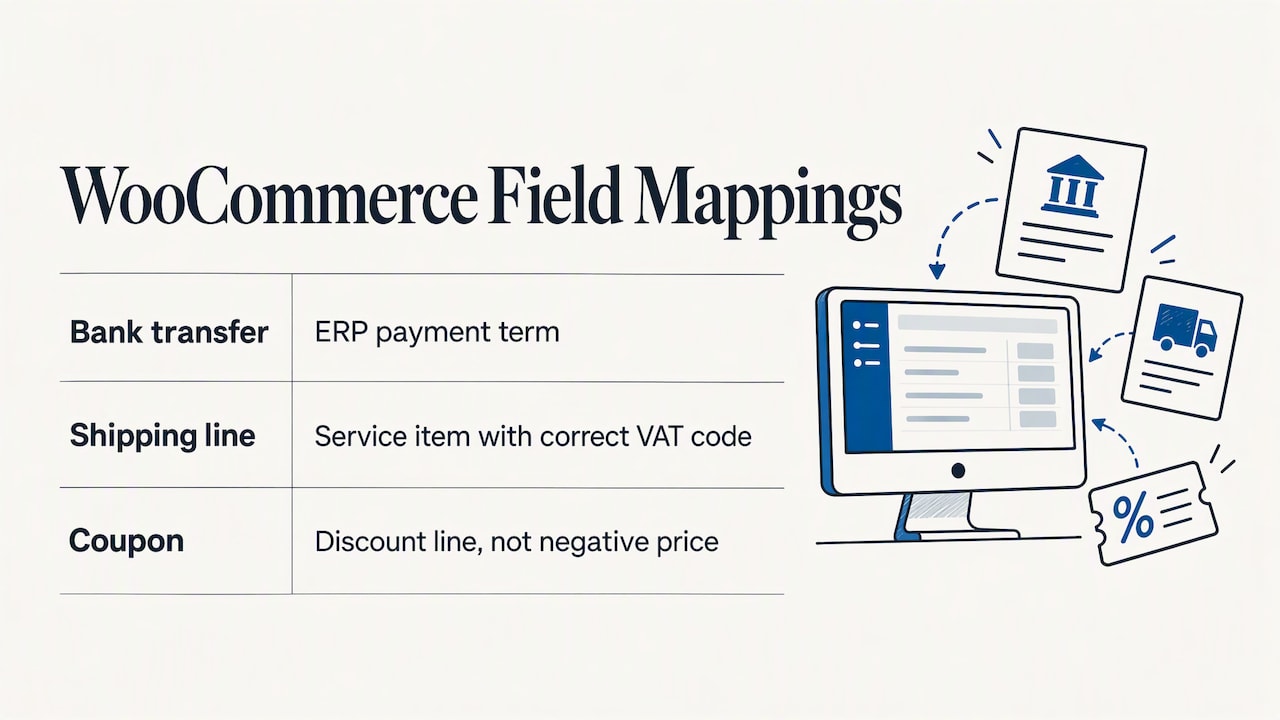
For each flow, document the source field, the target field, the transformation and the failure behavior. Examples: WooCommerce payment method “bank transfer” maps to the ERP payment term; the shipping line maps to a service item with the correct VAT code; a coupon maps to a discount line, not a negative price. If you rely on discount codes, see how WooCommerce coupons work so the ERP receives them in a form it can post.
4. Build in a staging environment
Use a copy of the store and a test company in the ERP. Never test on live accounting data.
5. Test the awkward cases
A test with one simple order proves nothing. Run at least these:
- An order with a coupon and a free shipping threshold.
- A company purchase with a VAT number and an SdI code.
- A partial shipment and a cancellation.
- A full and a partial refund.
- A customer from another EU country, and one outside the EU.
- An out-of-stock item ordered at the same moment as another customer.
- A burst of orders, to check that nothing is dropped or doubled.
6. Launch in a quiet period
Switch over on a low-traffic day, keep a person watching the first orders end to end and have a rollback plan. Run the old manual routine in parallel for a few days if accounting is sensitive.
For a deeper look at the order flow itself, read how to automate e-commerce order management in the ERP without errors, and for a broader SME-oriented overview see our WooCommerce and management software integration guide.
Italian compliance: what to check before going live
This is where generic guides written for other countries stop, and where Italian projects most often get stuck. Confirm the points below with your accountant, because tax treatment depends on your situation.
Electronic invoicing and the SdI
Invoices issued to Italian businesses go through the Sistema di Interscambio (SdI). Your checkout must therefore collect what the XML invoice needs: legal name, VAT number or tax code, address, and the recipient code or certified email (PEC). A missing or malformed value is a common cause of rejected invoices. The ERP should generate and transmit the invoice, and the store should only pass clean data. Our guide to integrating e-commerce and ERP with the SdI without rejections lists the typical causes.
Foreign currency
If you sell in currencies other than the euro, remember that in Italian e-invoices the taxable amount and the tax must be expressed in euros; the Agenzia delle Entrate notes that the XML has additional fields where foreign-currency values can be shown for internal purposes. Make sure the conversion rule is defined in the integration and that the ERP, not the store, produces the legal amounts.
Consumer sales and receipts
For online orders delivered physically, the Agenzia delle Entrate has described this as indirect e-commerce, comparable to mail-order sales. In its ruling no. 416 of 2020, it states that these sales are generally exempt from receipt or invoice certification unless the customer asks for an invoice, and that proceeds are recorded in the relevant VAT register. In practice, your integration needs a rule for the “customer requests an invoice” case and a correct posting of the other orders. If you also sell in a physical shop, see how the electronic receipt fits in an ERP. Sales to other EU countries may add reporting duties, covered in our guide to Intrastat in an ERP.
Privacy and data handling
The integration moves personal data between systems, and possibly through a third-party middleware or hosting provider. Record which systems process the data, where they are hosted, who is responsible and how long logs are kept. Check that your privacy notice reflects the flows. Choosing hosting in Italy or the EU simplifies this part of the file.
Monitoring and troubleshooting
An integration is not finished at launch. It is a process that runs every minute and needs the same attention as the warehouse.
What to monitor:
- Orders in the store without a matching ERP order after a set time.
- Queue length of pending synchronization jobs.
- Error log entries grouped by cause (validation, timeout, authentication).
- Stock differences between store and ERP on a sample of items.
Common failures and how to handle them:
| Symptom | Likely cause | Fix |
|---|---|---|
| Duplicate orders in the ERP | Retry after a timeout without an idempotency check | Store the WooCommerce order ID in the ERP and reject repeats |
| Duplicate customers | Matching on email only | Match on VAT number or tax code first |
| Order rejected by the ERP | Unknown item code, missing tax code, invalid VAT rate | Validate before sending; route failures to a review queue |
| Stock out of sync | Batch delay, or manual edits in the store | Event-based updates; lock stock editing in the store |
| Invoice rejected by the SdI | Wrong recipient code, missing data | Validate format at checkout |
| Sync stops silently | Expired API key, plugin update, server limits | Alert on inactivity; review after every update |
Two habits prevent most incidents. Keep the integration under change control: test every WooCommerce, theme or plugin update in staging first. And define a reconciliation routine: once a day, compare the number and total value of orders in the store and in the ERP. If they differ, you know within hours, not at month end.
Our point of view
In thirty years of working on management software, we have seen the same pattern: companies buy a connector and expect it to solve a process problem. It does not. The connector moves data; it does not decide who owns the price, when stock is reserved or what happens to a return. Those decisions belong to your business, and someone has to make them with you.
That is why every customer at Linkware has a single consultant who studies their processes and stays their point of reference, instead of a call center that sees each request for the first time. The same team handles development and user assistance, so the person who configures your flows is not a stranger to the person who fixes them. For a WooCommerce project this matters in practice: when an order is stuck, the first question is not “which plugin” but “what did this customer buy, and how do you normally handle it”.
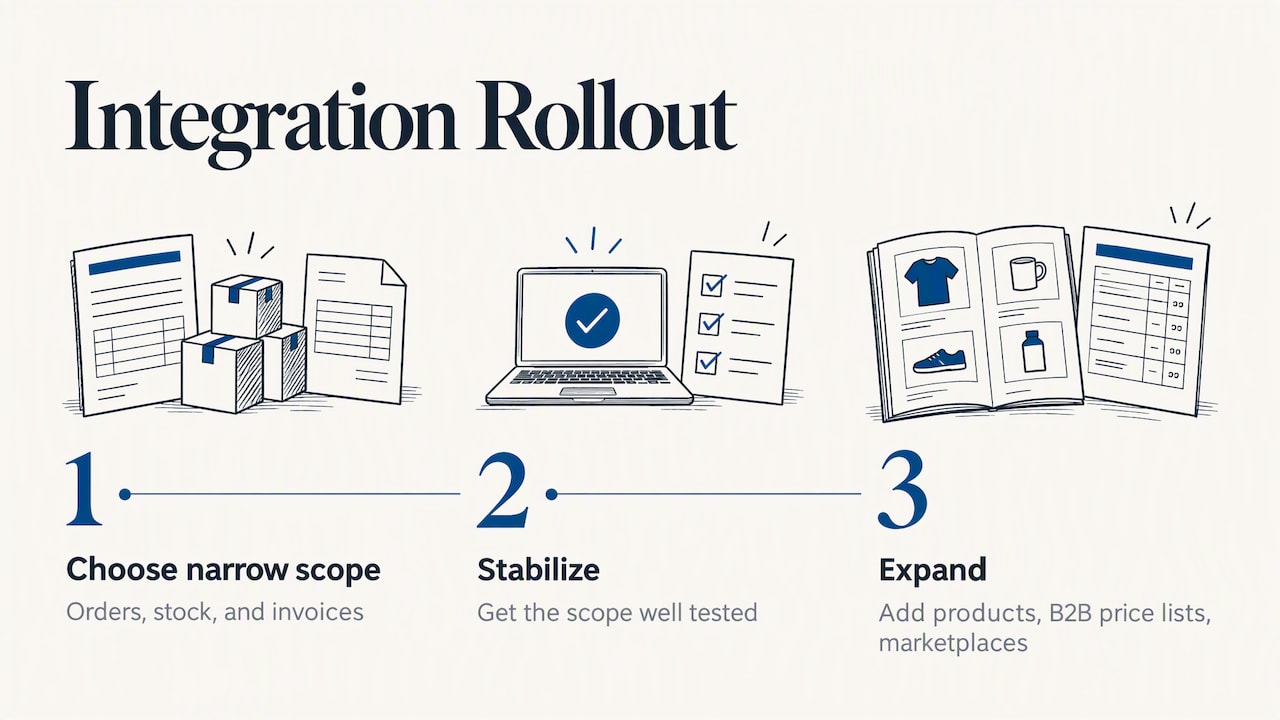
Our advice for a small or medium business: start with a narrow, well-tested scope (orders, stock, invoices), get it stable, and add products, B2B price lists or marketplaces afterward. If your store targets wholesale buyers too, our guide on turning WooCommerce into a B2B channel shows what changes in the data flow.
— Claudio
How Linkware can help
We configure ERP software around your operations, including Passepartout solutions, and connect it to WooCommerce and PrestaShop stores. We also build the store itself, host it and maintain it, so the ERP, the website and the server are handled by one team. If you want to see how your orders, stock and invoices would flow, ask for a demo and we will map your process with you.
Start from our ERP and management software page or, if you also need the store, hosting or privacy compliance, from our web services. If your ERP and store should run on managed infrastructure, see our managed hosting for e-commerce.
FAQ
Can I connect WooCommerce to my existing ERP?
Usually yes, if the ERP offers an API, import files or a ready-made connector. The real question is whether it can represent your rules, such as price lists, variants and VAT treatment. A short analysis of your order flow tells you before you spend on development.
Is a plugin enough or do I need a custom integration?
A plugin is enough when your products, prices and invoicing are standard and volume is moderate. Choose a custom integration when pricing logic, bundles, B2B conditions or several warehouses are part of how you sell. Test the plugin with your hardest orders before buying.
Does WooCommerce replace accounting software?
No. WooCommerce records sales, but it does not manage the chart of accounts, VAT registers, electronic invoices through the SdI or the warehouse. These stay in the ERP or accounting system, which is why the integration should pass orders and payments to it. For the accounting side, read how to unify accounting and sales in one system.
How long does an integration project take?
It depends on the scope, the quality of your data and the number of exceptions. A standard flow of orders, stock and invoices is far quicker than a project with custom price lists and several channels. Most of the time goes into mapping and testing, not into coding.
What should I do when synchronization fails?
Check the error log first, then compare the order in the store with the ERP to see where it stopped. Fix the cause (a missing tax code, an expired key, an unknown item), then re-send the order only once, to avoid duplicates. If it happens repeatedly, add validation before the data leaves the store.
Recommended
Vuoi digitalizzare la tua azienda?
Un consulente LINKWARE ti propone la soluzione su misura, senza impegno.
Richiedi una demo gratuita