
Blog · Gestionale
ERP MES Integration: How to Connect Shop Floor and ERP
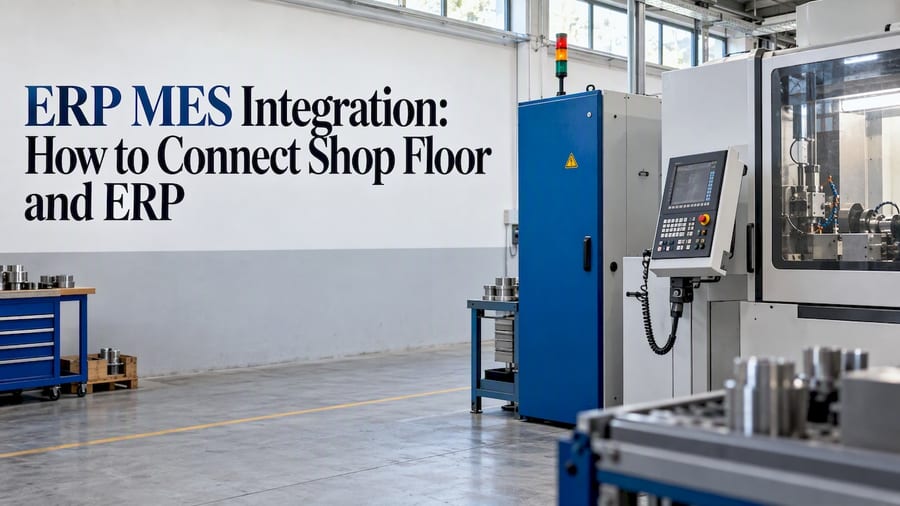
ERP MES integration connects the system that plans your business (orders, purchasing, stock, costs) with the system that runs production on the floor (work orders, machines, operators, times, scrap). Production orders go down from the ERP to the MES. Actual times, quantities and scrap come back up. The result is one version of the truth, with no one retyping data between a spreadsheet, a paper sheet and the management software.
This guide explains what each system does, what data should move between them, which integration models exist, where projects usually go wrong, and how an Italian small or mid-sized manufacturer can plan the work in clear steps.
TL;DR
- ERP manages orders, purchasing, sales, warehouse and costs. MES executes and monitors production in real time. Integration makes them exchange data automatically.
- The core flow is simple: production orders go from ERP to MES, and times, quantities and scrap come back from MES to ERP.
- Integration is not automatic. Define precise objectives and reliable machine-data collection before you connect anything.
- Start with one department or line, validate the result, then scale. A PDCA cycle works well for this.
- A single consultant who knows your processes shortens the path from requirements to a working integration.
Table of Contents
- ERP and MES: two systems, two jobs
- What data should flow between ERP and MES
- What you gain from the integration
- Integration models and technologies
- The machine-data layer comes first
- The main challenges, and how to handle them
- A step-by-step plan for an Italian manufacturer
- Our perspective
- How Linkware can help
- FAQ
ERP and MES: two systems, two jobs
An ERP system manages the administrative and logistical side of a company: orders, purchasing, sales, warehouse and inventory. An MES (manufacturing execution system) works closer to the machines. The same source describes it as a tool for monitoring production activities in real time, including personnel, machinery and production times.
Gartner defines the MES as a system that manages, monitors and synchronizes physical processes in real time, coordinates orders with planning and supports traceability and genealogy. In practice, that means an MES knows which operator ran which order on which machine, with which material lot, and how long it took.
An academic thesis from the Politecnico di Torino treats them as complementary layers: the ERP handles manufacturing planning and logistics, while the MES exchanges execution information with the enterprise layer and connects downward to production-control systems.
| Aspect | ERP | MES |
|---|---|---|
| Main question | What should we produce, buy and ship? | What is happening on the line right now? |
| Time horizon | Days, weeks, months | Seconds, minutes, shifts |
| Typical data | Orders, bills of materials, stock, costs, invoices | Start/stop times, quantities, scrap, downtime, lots |
| Main users | Planning, purchasing, sales, accounting, management | Production managers, supervisors, operators, quality |
| Connects to | Suppliers, customers, accounting, e-commerce | Machines, PLCs, sensors, terminals |
If you want a deeper look at the MES side alone, our page on what an MES does and when you need it covers it from the shop-floor perspective.
What data should flow between ERP and MES
A 2023 academic review describes the MES as a two-way link between enterprise planning and factory control: it receives orders from the ERP and collects data from PLCs, SCADA systems, sensors and devices.
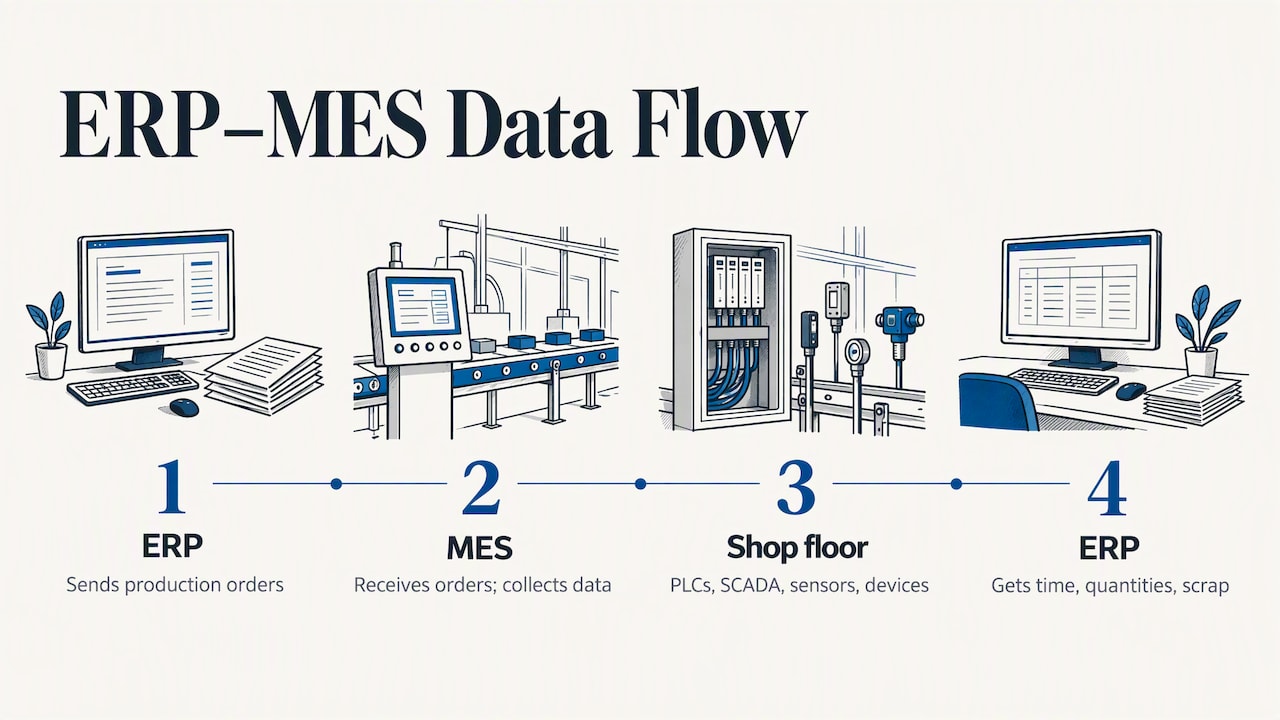
An Italian industry article explains the same loop: production orders move from the management system to the MES, while machine-derived data such as elapsed time, quantities and scrap flow back to the ERP.
From ERP to MES
- Production orders with quantities, due dates and priorities
- Bills of materials and routings (the sequence of operations)
- Item master data and work-center definitions
- Material availability and planned schedule changes
From MES to ERP
- Start and end times of each operation
- Good quantities and scrap, with reason codes
- Material consumption and lot or serial numbers for traceability
- Machine downtime and quality notifications
- Order status, so that sales and planning see real progress
Once actual data arrives in the ERP, costing becomes more accurate. You compare the planned time of an operation with the time it really took, and the difference shows where margin is lost.
What you gain from the integration
The Politecnico di Torino thesis lists several benefits of ERP-MES integration: real-time material-availability data, demand-driven schedule changes, quality notifications, higher overall equipment effectiveness, shorter cycle time and better management visibility.
Italian cases show what that can look like. In a digital production and warehouse project at Mebra Plastik Italia, order-preparation time fell by more than 30%, with the error margin approaching zero. At steel manufacturer Calvi, integrating a legacy MES with a large ERP suite and its integration platform reduced planning time by 30% and increased machine-use efficiency by 20% in the pilot examined. These are results of specific projects, not guarantees. Your own gain depends on how much manual work and waiting exists today.
The practical benefits tend to fall into four groups:
- Less double entry. Operators and clerks stop copying data between systems, which removes a common source of errors.
- Faster, better planning. Planners see real progress and real capacity, not last week’s estimates.
- Accurate costs. Actual hours, scrap and consumption feed the ERP, so margins per order are based on facts.
- Traceability. Lots, operators and machines are linked to each finished product, which helps with customer audits and recalls.
Integration models and technologies
There is no single correct architecture. The main options differ in effort, flexibility and long-term maintenance.
| Model | How it works | Best when | Watch out for |
|---|---|---|---|
| Point-to-point | ERP and MES are connected directly through a custom interface | Two systems, stable processes, small scope | Grows hard to maintain as systems are added |
| Middleware or integration bus | A layer sits between systems and translates messages | Several systems, mixed technologies | Needs governance and design discipline |
| Native or suite-based | ERP and MES come from the same platform or are pre-configured together | You want fewer interfaces and one support contact | Less freedom to mix best-of-breed tools |
Academic work on this topic proposes using the ISA-95 standard to define the integration model and a service-oriented architecture with an enterprise service bus, using REST, SOAP and WSDL web services. The authors note that the bus can ease communication between heterogeneous systems. ISA-95 is useful even if you never build a bus: it gives ERP people and production people a shared vocabulary for what each level owns.
For most small and mid-sized manufacturers, the decision comes down to three questions:
- How many systems must exchange data now, and how many in three years?
- Does the ERP expose stable interfaces (APIs, import/export, web services)?
- Who will maintain the integration after go-live?
Hosting matters too. Whether the ERP runs in the cloud or on your servers changes how the MES reaches it. Our guide on ERP cloud vs on-premise for Italian SMEs walks through that choice.
The machine-data layer comes first
Most integration problems start below the MES, not above it. If a machine does not send reliable signals, the MES has nothing trustworthy to pass to the ERP. The Innovation Post article quoted above makes the point that integration is not automatic: manufacturers should define specific objectives and establish reliable machine-data collection and normalization before connecting production information to the ERP.
In a typical plant you will find a mix: recent machines with open protocols, older ones with only digital I/O, and manual operations with no signal at all. Each needs its own capture method, such as a PLC connection, a sensor, or a terminal where the operator confirms the operation. We explain the options in our article on shop floor data collection and how to connect machines to your ERP.
Normalization matters as much as capture. “Stop”, “pause” and “setup” must mean the same thing on every line, with a fixed list of reason codes, or the ERP will receive numbers that cannot be compared.
The main challenges, and how to handle them
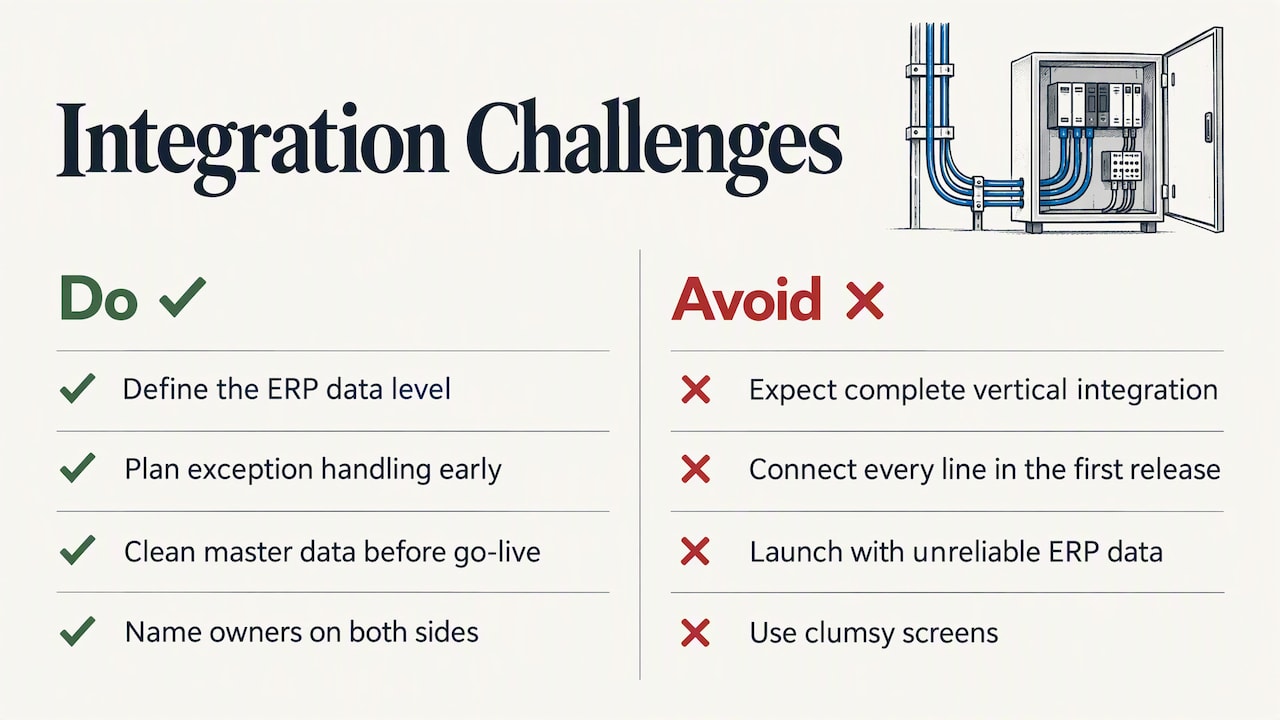
Complete vertical integration is still hard. The 2023 review observes that fully vertical integration remains difficult and that human contribution is still needed to bridge gaps between systems. The MES abstracts factory data to the level the ERP requires, but someone has to decide what that level is. Plan for exception handling from the start: what happens when an order is split, a lot is blocked, or a machine goes down mid-operation?
Digital maturity is uneven in Italy. ISTAT’s 2023 report shows that ERP adoption and electronic data sharing remain incomplete, especially among SMEs. It found that 42.2% of Italian companies had adopted ERP software, that 48.7% of companies with at least 10 employees used at least one ERP, CRM or BI software, and that only 14.3% shared data electronically in the supply chain. If your company is at the start of this path, an ERP clean-up usually comes before the MES. Usability also decides whether people use the system: clumsy screens lead to skipped entries, as discussed in this piece on software interfaces in the energy sector.
Poor master data. Wrong routings, outdated bills of materials or duplicate items in the ERP will be amplified by the MES. Clean them before go-live.
Unclear ownership. When production blames IT and IT blames the software vendor, issues stay open. Name one owner on your side and one on the implementer’s side.
Too much scope at once. Trying to connect every line and every report in the first release is the most common way to delay a project.
A step-by-step plan for an Italian manufacturer
A University of Padua thesis on a lean-guided MES implementation at an industrial company analyzes the operating context and its inefficiencies, then applies a PDCA (plan, do, check, act) approach to design, implementation and validation, and discusses standardization and scalability. Its goals were process control, traceability, real-time data capture and later scale-up. The same logic works for most SMEs.
- Map the current flow. Follow one order from quote to shipment. Note where data is typed twice, where paper is used, and where people wait for information.
- Set measurable objectives. Examples: cut order-preparation time, know the real cost of each order, trace lots to customers. Pick two or three, not ten.
- Audit ERP data and machines. Check routings, bills of materials and work centers. List which machines can send signals and which need terminals or sensors.
- Choose the architecture. Decide on direct interface, middleware or a pre-integrated suite, using the criteria above.
- Pilot on one line or department. Keep the scope small enough to validate within weeks, not quarters.
- Check the results against the objectives. Compare planned and actual times, scrap and data quality. Fix reason codes and interfaces.
- Train and standardize. Operators and supervisors need to know why each entry matters. Write the rules down.
- Scale. Extend to other lines, add reports and dashboards, and review regularly.
If your goals involve compliance and the Industry 4.0 and 5.0 framework, our page on MES software for Industry 4.0 and 5.0 describes how we approach it. Plants with a warehouse should also look at how the MES and the warehouse system divide responsibilities, covered in MES vs WMS and how to integrate them.
Our perspective
We have worked with ERP software for 30 years, and the pattern is consistent: integration projects succeed when someone understands the client’s real processes, not just the software. That is why each client works with one dedicated consultant who studies how the company operates and stays the point of contact, instead of a call center that sees each request as a new case.
Our advice to a manufacturer starting out:
- Do not buy an MES to fix an ERP that is not working. If orders, stock and bills of materials are unreliable, fix those first.
- Choose the smallest pilot that proves value. One line, one report the production manager actually wants.
- Keep development and user support under one roof. When the people who configure the integration also answer the phone when an operator has a problem, issues close faster and the solution stays aligned with how the plant really works.
- Treat compliance and traceability as design requirements from day one, not as add-ons.
We configure the ERP around the client, not the other way around, and we think that is the only way to keep a production system useful after the first year.
— Claudio
How Linkware can help
Linkware provides custom-configured ERP software for manufacturing, including Passepartout solutions and MES, with training, start-up and professional support included in the engagement. We can assess your current flow, define the pilot, and configure the data exchange between your management system and the shop floor.
Want to see how an integrated ERP and MES would work in your plant? Contact Linkware and request a demo tailored to your processes. You can also explore the MES for manufacturing page first.
FAQ
What is meant by ERP integration?
ERP integration means connecting the ERP with other systems so they exchange data automatically instead of through manual entry. Those systems can be an MES, a warehouse system, a CRM or an e-commerce platform. The goal is a single, consistent set of data for orders, stock and costs.
What is MES software used for?
An MES manages and monitors production in real time. It receives work orders, tracks operations on machines and operators, records times, quantities, scrap and lots, and supports traceability. Gartner’s definition also includes coordinating orders with planning.
Is an ERP system enough, or do I also need an MES?
If you need to know, while it happens, what each line is doing, or to trace each lot at operation level, an ERP alone usually falls short, because it works at the order level. Small shops with simple processes can often start with the ERP and add an MES later. A process review shows which case is yours.
How long does an ERP MES integration take?
It depends on scope, machine readiness and data quality, so no honest fixed figure exists. A pilot on one line is much faster than a plant-wide rollout, which is why we recommend starting small and scaling after validation.
Do I need to replace my current ERP to add an MES?
Not necessarily. What matters is that your ERP can exchange data through stable interfaces, such as APIs, web services or structured import and export. A technical review of the ERP is the first step to tell whether it can be integrated as it is.
Recommended
Vuoi digitalizzare la tua azienda?
Un consulente LINKWARE ti propone la soluzione su misura, senza impegno.
Richiedi una demo gratuita